


Blog Category
Showing 1-15 of 296.
SOLIDWORKS Simulation
Tech Tips and Tutorials for SOLIDWORKS Simulation, FEA, and CFD Applications




Exporting Isosurface Flow Regions Using SOLIDWORKS Flow Simulation
 By David Arthur, CSWE-S on March 22, 2024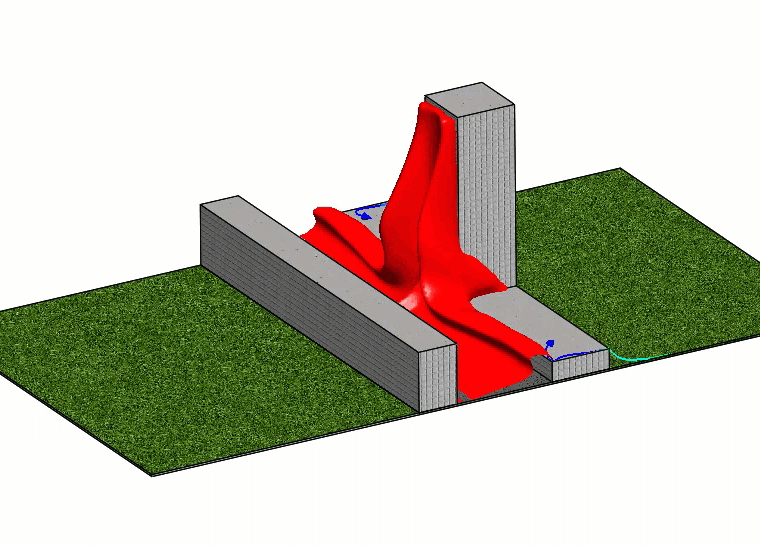
Learn how to export Isosurface flow regions from SOLIDWORKS Flow Simulation for use in downstream modeling.
 By
By 
Watch our video to discover what’s new for SOLIDWORKS Simulation 2024
Basic Setup Steps for an FEA Static Simulation in SOLIDWORKS
 By Alaa Hosn on January 24, 2024
SOLIDWORKS Simulation is a powerful finite element analysis (FEA) tool used to validate designs before they are manufactured. Learn how to activate the add-in.
Creating Multiple Bolt Connectors in SOLIDWORKS Simulation
 By Scott Durksen, CSWE on January 12, 2024
SOLIDWORKS Simulation Bolt Connectors are a great way to simplify your FEA studies for faster run times. Rather than having physical bolt geometry to mesh and interact with surrounding parts, a Simulation Bolt Connector adds…
Mistakes to Avoid with SOLIDWORKS Flow Simulation Fan Setup
By David Arthur, CSWE-S on November 29, 2023
Let’s take a look at a few tips that will help with the SOLIDWORKS Flow Simulation Fan setup. When defining a fan in a SOLIDWORKS Flow Simulation study here are a few of the most…
Optimize Your Workstation Budget for Design and Engineering Applications – Simulation
 By Alin Vargatu, CSWE on October 27, 2023
Learn how to optimize your SOLIDWORKS workstation budget for different CAD workflows, specifically structural and plastics simulation.
Simulation Diagnostic Tools: What They Are and When to Use Them
 By Ray Morrogh on June 29, 2023
There can be a lot to keep track of when setting up a simulation, and it can also be difficult to understand if the study you’re running will give you results that make sense. Thankfully,…
Physics Fun with Jamie: Best Practices for Applying Materials
 By Jamie Hill, CSWE/CSWE-S on June 27, 2023
Welcome back to “Physics Fun with Jamie”. SOLIDWORKS Finite Element Analysis (FEA) is a powerful tool for designing and analyzing products. The accurate representation of materials is an essential factor in the simulation’s success. Here…
Physics Fun with Jamie: Setting Up a Drop Test Study
By Jamie Hill, CSWE/CSWE-S on June 23, 2023
Welcome back to “Physics Fun with Jamie”. SOLIDWORKS Finite Element Analysis (FEA) is a powerful tool for simulating the effects of a drop on a product. The software can be used to perform a drop…
Physics Fun with Jamie: Setting Up a Design Study Analysis
By Jamie Hill, CSWE/CSWE-S on June 22, 2023
Welcome back to “Physics Fun with Jamie”. A design study analysis in SOLIDWORKS FEA is a powerful tool for simulating and optimizing the performance of a product or part. It allows designers to evaluate multiple…
Defining FFT Plot in SOLIDWORKS Flow Simulation
 By Suman Sudhakaran on June 20, 2023
After running a transient Flow Simulation study, frequency content or spectral information may be of interest. In SOLIDWORKS Flow Simulation, the fast Fourier transform (FFT) is used to convert the time signal to the frequency…
Physics Fun with Jamie: Setting Up a Topology Study in SOLIDWORKS FEA
By Jamie Hill, CSWE/CSWE-S on June 19, 2023
Welcome back to “Physics Fun with Jamie”. A topology study in SOLIDWORKS FEA is a powerful tool for optimizing the design of a part or assembly by determining the most efficient use of materials. It…

If the stock materials library is lacking in a material you may need, and you lack the information to create a custom material for a study you’d like to conduct in SOLIDWORKS Simulation, the solution lies in…
Physics Fun with Jamie: Best Practices for Creating Mesh
By Jamie Hill, CSWE/CSWE-S on May 8, 2023
Welcome back to “Physics Fun with Jamie”. Meshing is an important step in the Finite Element Analysis (FEA) process, as it affects the accuracy and efficiency of the simulation. Creating mesh requires careful consideration of…
Physics Fun with Jamie: Best Practices for Applying Fixtures
By Jamie Hill, CSWE/CSWE-S on April 21, 2023
Welcome back to “Physics Fun with Jamie”. SOLIDWORKS FEA is a powerful tool that allows users to simulate physical behavior of designs and analyze their performance under different loading scenarios. One of the key elements…

Design Services
From concept to manufacturing to scale, TriMech Design Services helps makers, startups, inventors, small manufacturers get to market.
Most Popular Posts

SOLIDWORKS 2024 Hardware Recommendations
TriMech has compiled this recommended SOLIDWORKS 2024 hardware guide to aid you in the process of upgrading or purchasing new hardware for SOLIDWORKS.

IMPORTANT! Transfer Activation Prior to Upgrading to SOLIDWORKS 2024
Prior to installing SOLIDWORKS 2024, you need to transfer activation from your prior release of SOLIDWORKS to ensure it’s available to activate SOLIDWORKS 2024.

SOLIDWORKS Packages Comparison
What is the difference between SOLIDWORKS® Standard, Professional and Premium 3D CAD software? Learn about the features included in each of the three SOLIDWORKS offerings.