


Blog Tag
Showing 1-11 of 11.
SOLIDWORKS Display
Tech tips, tutorials, and best practices for SOLIDWORKS Display from the Javelin technical team

Scaling the SOLIDWORKS User Interface
The overall scale of the SOLIDWORKS user interface is affected by a few different key settings, both inside and outside…

Solutions for Common SOLIDWORKS Display Issues
Is your SOLIDWORKS graphics area black? Or has your model disappeared from view? We discuss these SOLIDWORKS display issues and how to resolve them.

Window off screen in SOLIDWORKS? Get it back!
Ever find yourself asking, “Hey! Where did my window go?” or, “Why is my window off the edge of the…

How to change SOLIDWORKS Visualize 3D Viewport Resolution
When a 3D model is imported into SOLIDWORKS Visualize, the resolution that we see in a preview within the viewport…

SOLIDWORKS 2021 now includes Accelerated Zoom!
I was tired of how much zooming I had to do with the mouse wheel in SOLIDWORKS… Several scrolls of…

SOLIDWORKS 2019 Add Display Data Marks for Quick View of Parts
SOLIDWORKS 2019 now has the ability to apply Display Data Marks to part configurations. This allows you to open complex…

Three SOLIDWORKS Video Issues and how to solve them
Experiencing SOLIDWORKS Video issues? Here are three common issues and how to solve them: Assembly or part disappears You are…

Disabling SOLIDWORKS Wireframe Colour
Two settings determine if part colours are displayed in a SOLIDWORKS assembly set to wireframe, HLR or HLV mode; one…

How to quickly show ALL hidden components in your SOLIDWORKS assembly
Have you ever gotten a little trigger happy with suppressing components in your assembly? It can be tedious sometimes to…
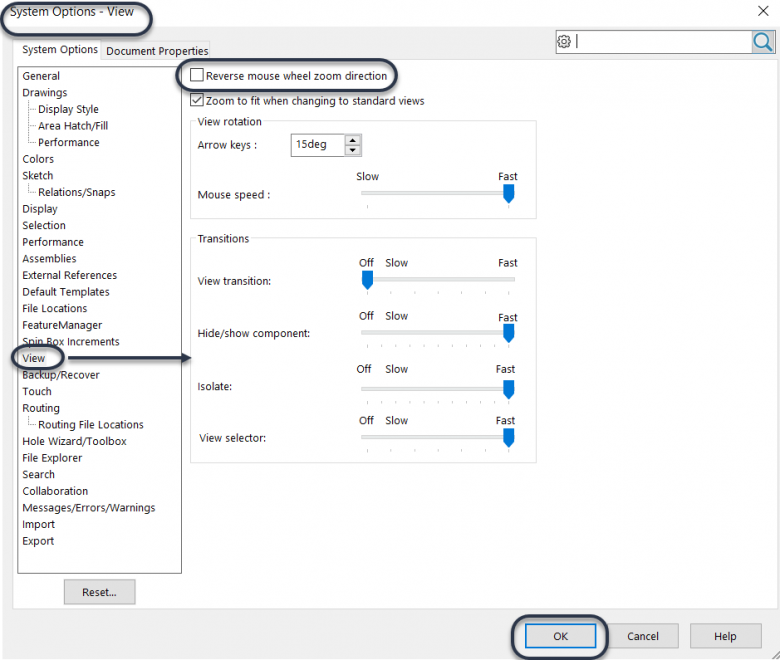
How to change the SOLIDWORKS zoom direction of your mouse wheel
When some companies/designers switch to SOLIDWORKS 3D design from other designing software they often have issues with zooming in and out…

My SOLIDWORKS Transparent Part will not revert back to Shaded?
You have a SOLIDWORKS transparent part, but can’t convert it back to shaded? In this blog article we will review…