


How to change the SOLIDWORKS zoom direction of your mouse wheel

Article by Vipanjot Kaur, CSWP updated December 8, 2017
Article
When some companies/designers switch to SOLIDWORKS 3D design from other designing software they often have issues with zooming in and out as in other software zooming in and out using the mouse wheel occurs in reverse. This can be annoying that when you try to zoom into the model, it zooms out and vice-versa.
Well, to make yourself more productive this annoyance can be removed; as there is a SOLIDWORKS 2018 option to change the direction of the mouse wheel for zooming in and out .The zoom in and out behavior can be set to the same way you used it in your previous software.
To change the SOLIDWORKS zoom direction:
- Click Options or Tools > Options.
- In the dialog box, on the View tab, select Reverse mouse wheel zoom direction.
- Click OK to finish the command.

Reverse mouse wheel zoom direction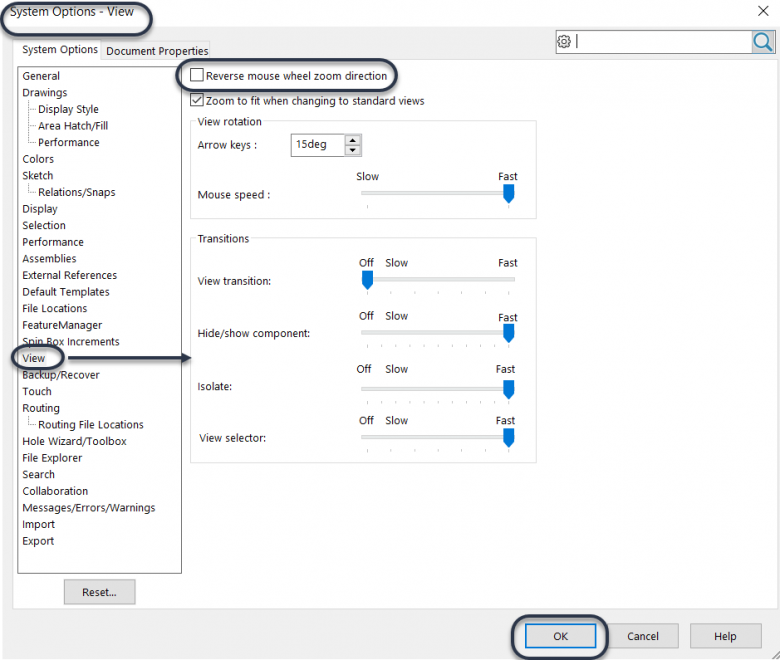

Related Links
Certified SOLIDWORKS Services available from Javelin
Javelin can help you to:
Posts related to 'How to change the SOLIDWORKS zoom direction of your mouse wheel'
