


How to prepare pictures of real parts or hand drawn sketches as input for SOLIDWORKS 3D models

Article by Rod Mackay updated November 30, 2011
Article
As SOLIDWORKS users, sometimes we have to convert hand drawn sketch into SOLIDWORKS model provided by a creative professional, such as an industrial designer. Quickly adjusting the images in Adobe Photoshop can provide more accurate results when the images are used as modelling aids in SOLIDWORKS.

The above image is used in our SOLIDWORKS Surface Modeling training course. It is representative of a hand drawn sketch made by an Industrial Designer. In discussions with the designer, we have determined that the remote is symmetrical and the top silhouette edge in the side view is supposed to be horizontal.
In Adobe® Photoshop®, the first thing I do is use the rectangular marquee to draw a box around the edges of the remote. I then use the crop tool (Image > Crop) to shrink the image to the edges of the remote. This will help in sizing the sketch in SolidWorks, as I can simply enter a numeric size for the image, versus resizing the image until it fits a line in a sketch.

Next, using the Free Transform tool, I will distort the image to adjust the top silhouette edge as flat.
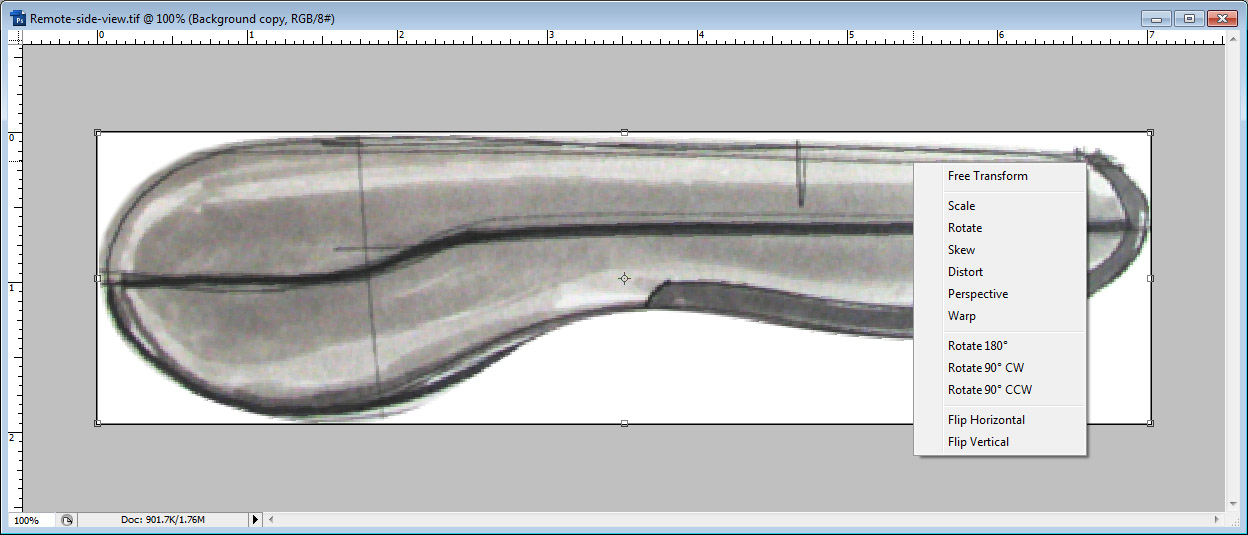
I drag the top control point to distort the image, and then confirm the transform operation.

Then, I use the Hue/Saturation command (Ctrl-U) to completely de-saturate the image, turning it to true black and white.

Next using the Levels command (Ctrl-L), I will adjust the black/grey/white balance in the image to bring out the outlines of the product.

Here is the final Image.

After creating a new part in SolidWorks, I will create a new sketch on the right plane. To place the image, use a Sketch Picture. (Tools > Sketch Tools > Sketch Picture). To set the size of the image, I only need to edit fields in the Sketch Picture Tree, instead of manually resizing and dragging. I’ve also aligned the parting line on the origin.

These techniques are also useful when reverse engineering parts. The image below is an example of a plastic remote control I reversed engineered.

To model the curves of the remote, I used a camera to take a picture, and used the Photoshop Distort Tool to align for any slight distortion caused by the camera lens. I can now import my sketch to begin modelling.

Related Links
Certified SOLIDWORKS Services available from Javelin
Javelin can help you to:
Posts related to 'How to prepare pictures of real parts or hand drawn sketches as input for SOLIDWORKS 3D models'
