


SOLIDWORKS PDM 2020 Web2 Bill of Materials

Article by Nadeem Akhtar updated September 24, 2019
Article
New in SOLIDWORKS PDM 2020 Web2 you now have the ability to see a read-only view of the Bill of Materials.
The large screen layout – BOMs:
In the large screen layout, the Bill of Materials tab is available in the file detail view. It displays the bill of materials of SOLIDWORKS PDM items or of a SOLIDWORKS assembly, drawing, part or weldment part.
The supported BOM types are:
- Computed BOMs
- Weldment BOMs
- Weldment cut lists
- SOLIDWORKS BOMs
To display the Bill of Materials click on the file name and select Bill of Materials tab.

Bill of Materials – Large Screen Layout

The small screen layout – BOMs:
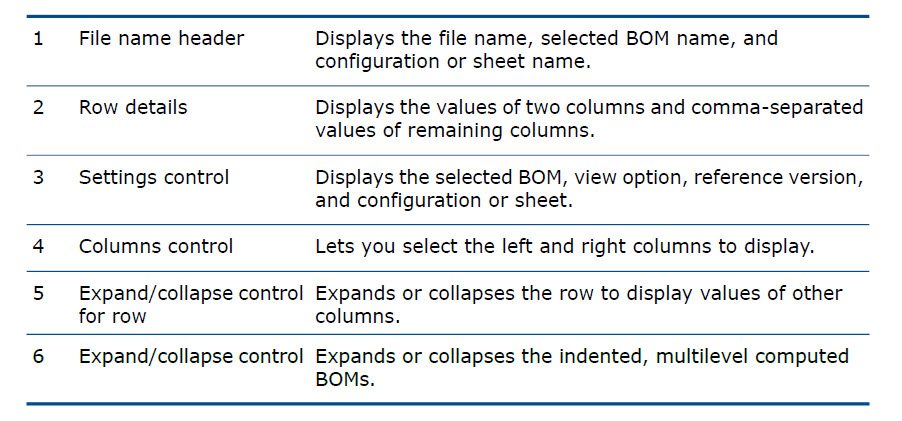
In the small screen layout, the Bill of Materials tab is available from the ellipsis menu. The tab contains two customizable columns.
To display the Bill of Materials tab, in the file detail view, click the ellipsis, and click Bill of Materials.

Watch a demo video
Learn more about the enhancements to SOLIDWORKS PDM 2020 Web2 in the video below:
Related Links
Want to do more with SOLIDWORKS PDM?
Our Certified SOLIDWORKS PDM Experts can help you to:
Posts related to 'SOLIDWORKS PDM 2020 Web2 Bill of Materials'
