


How to Monitor Tasks in SOLIDWORKS PDM

Article by Nadeem Akhtar updated June 25, 2020
Article
Use the Task List dialog box in SOLIDWORKS PDM Administration to monitor tasks and view information about completed tasks.
To monitor tasks:
- Expand Tasks and double-click Task List

SOLIDWORKS PDM Task List
- In the Task List dialog box, under Pending tasks, view tasks that are executing or waiting to execute
SOLIDWORKS PDM Pending Tasks
- You can Suspend, Resume, or Cancel pending tasks
Right-click Menu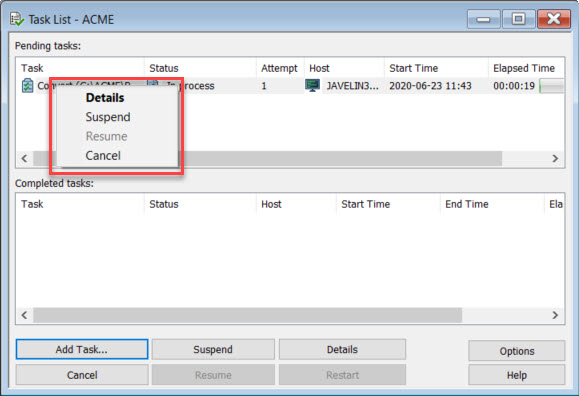
- You can Suspend, Resume, or Cancel pending tasks
- Under Completed tasks, view tasks that have finished executing
SOLIDWORKS PDM Completed Tasks
- To see additional information about a task, select it and click Details
SOLIDWORKS PDM Task Details
- Error information is displayed for failed task
- To specify the number of task records displayed under Completed tasks, click Options
Task List Options
- To Launch a task from the Task List dialog box, click Add Task
Related Links
Want to do more with SOLIDWORKS PDM?
Our Certified SOLIDWORKS PDM Experts can help you to:
Posts related to 'How to Monitor Tasks in SOLIDWORKS PDM'
