


SOLIDWORKS PDM 2021 Treehouse view in the Where Used tab

Article by Samir Lohmann updated September 29, 2020
Article
SOLIDWORKS PDM Professional 2021 introduces the possibility to show a Treehouse view from any file’s Where Used tab.
With the Treehouse view, you can visually navigate through all assemblies and drawings that use a file. This can save you the time you would take to browse to different parent components from the List view, and many times having to browse back to the original file. You can also select one or multiple files and use the context menu (right-click) to check-out, check-in, browse to files, and start many other actions.
To enable this functionality, simply navigate to the Where Used tab, press the button on the top right corner of the tab, and select Treehouse view.
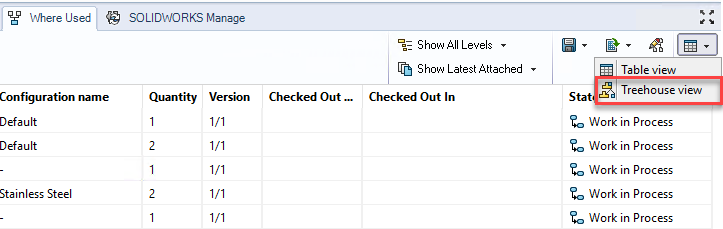
Enabling the Treehouse View
NOTE: This functionality was already present in the Contains tab since version 2020 SP2, thus some people may have missed this because it was not part of a major release. It is always a good idea to check out what’s new in every Service Pack. You may find a hidden gem.

Related Links
Want to do more with SOLIDWORKS PDM?
Our Certified SOLIDWORKS PDM Experts can help you to:
Posts related to 'SOLIDWORKS PDM 2021 Treehouse view in the Where Used tab'
