


How to: Managing Redundancies in SOLIDWORKS Motion Analysis

Article by David Arthur, CSWE-S updated August 27, 2024
Article
Managing Redundancies and Degrees Of Freedom (DOF)
When mating components in an assembly in the normal SOLIDWORKS assembly environment we don’t need to give much thought to DOF or managing redundancies. The primary consideration is that we satisfy component positioning and downstream production. When we move that same assembly over to SOLIDWORKS Motion Analysis, DOF, managing redundancies, and proper mechanism motion becomes much more important. In a previous article, SOLIDWORKS Motion Analysis: First Steps to Success, we discuss the first steps that should be taken when tasked with creating a motion analysis from an existing SOLIDWORKS assembly. This article provides more detail on the third step in that process, developing a mating scheme that takes DOF into account and managing redundancies.
Rigid Body Motion in SOLIDWORKS Motion Analysis
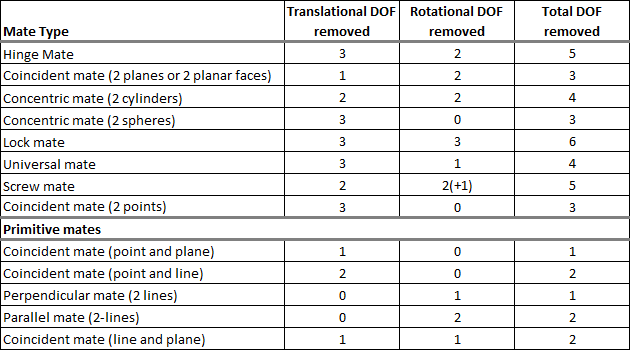
In SOLIDWORKS Motion Analysis, all components move as rigid bodies. They cannot deform or change shape in any way. Each unconstrained component has six degrees of freedom (DOF): three translational (in X, Y, and Z), and three rotational (about X, Y, and Z). Each mate that’s added removes a certain number of DOFs from the system. The table below shows some of the mates in SOLIDWORKS and how many DOFs that they restrict.
 What is a Redundancy?
 What is a Redundancy?
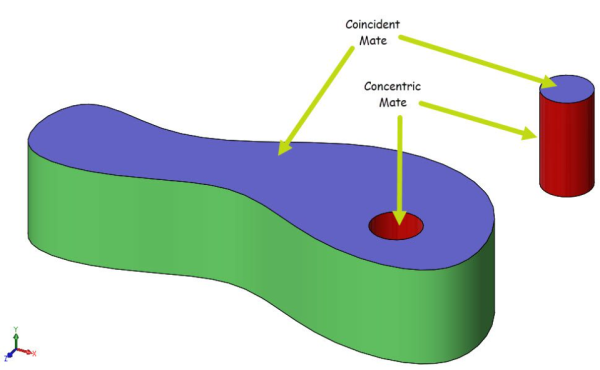
Redundancies are when multiple mates remove the same DOF for a component. For example, consider the two components below. Assume the base component is Fixed, so 0 DOF and the pin is unconstrained with 6 DOF. So, our simple example starts with 6 DOF total. We would like the pin to be able to rotate freely in the hole, so we really only need to remove five DOF. This is a basic hinge joint so in the normal SOLIDWORKS assembly environment we might use a concentric mate to align the cylindrical faces (red) of the pin and hole in the base component, and then use a coincident mate to align the planar faces (purple) of the components. This would work fine in the SOLIDWORKS assembly environment and leave the pin free to rotate.
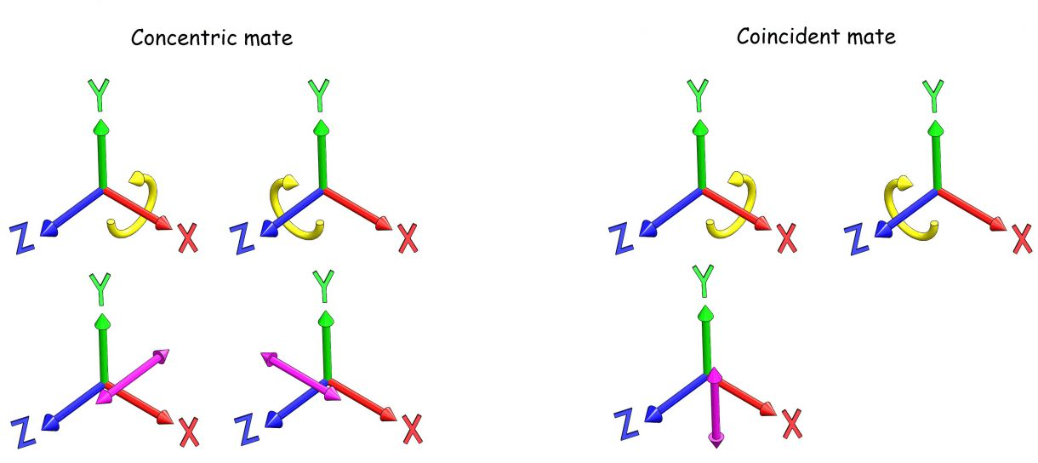
Now let’s look at how the motion solver will interpret this mating scheme. The base component is fixed so it has 0 DOF. The pin starts as unconstrained with 6 DOF. The concentric mate removes translation along the X and Z axes as well as rotation about the X and Z axes. So, the concentric mate removes four DOF in total. The coincident mate removes translation along the Y axis as well as rotation about the X and Z axes. So, the coincident mate removes three DOF total. These two mates together remove a total of seven DOF for a component that has only six DOF and for which we really only want to remove five DOF to allow for the desired motion. This is happening because both of these mates remove some of the same DOF, specifically, rotation about the X and Z axes. When two, or more, mates remove the same DOF for a component we call these redundancies.
How does the Motion Analysis solver manage redundancies?
When redundant constraints are present, the solver will attempt to remove the redundant constraints automatically, otherwise it cannot solve the set of motion equations. This might work ok in simple cases but for complex mechanisms, this may not work out so well. Important constraints may be removed which could lead to bodies separating or solver lockup. There may also be cases where the study calculates successfully, but the reaction forces are incorrect. The best solution for dealing with redundancies is to create mates in a systematic piece-by-piece manner with DOF in mind.
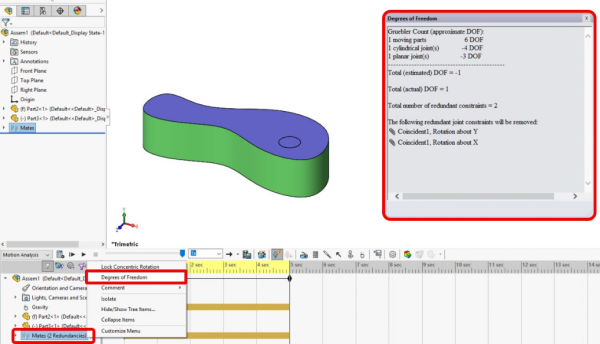
When we run the study, it will show the number of redundancies next to the Mates folder. If you right-click on the Mates folder and select Degrees of Freedom, it shows a list of DOFs and the redundancies in the mates.
Degrees of Freedom (DOF)
What can be done to manage redundancies?
In cases where the normal SOLIDWORKS mates would create redundancies, here are a few suggestions on how to manage redundancies.
- Use special Mechanical Mates like the Hinge mate. The Hinge Mate is a great option for the example above. The hinge mate selection consists of two cylindrical faces and two planar faces just like in the example above, but it only removes 5 DOF and leaves the rotational DOF about the axis of the cylinders unconstrained. This is a special mate specifically intended for motion analysis which is why it’s located on the Mechanical Mates tab of the mate property manager.
- Use Primitive mates to minimize the number of DOF removed for each mate.
- Use Bushings which can be thought of as spring damper elements in the mates giving the connections between components some slight “wiggle” room. This allows the solver to find a solution despite the redundancies.
- It’s best to add/configure the bushing at the individual mate level. The bushing setting can be found on the Analysis tab of the mate property manager for each mate.
- Avoid the use of the global option “Replace redundant mates with bushings”. This option will likely cause problems with the study. It may solve but give incorrect results.
- In some cases, Motors can be added to the motion study to eliminate one DOF. One common use of this is to prevent rotation of a component. Within the motion study, a rotary motor can be added to the cylindrical face of a component to prevent rotation. This will remove only that one rotational DOF for the component about that cylindrical face.
Related Links
Certified SOLIDWORKS Services available from Javelin
Javelin can help you to:
Posts related to 'How to: Managing Redundancies in SOLIDWORKS Motion Analysis'
