


SOLIDWORKS Weldment Profiles for Free

Article by Dave Ramsey updated October 4, 2024
Article
Thanks to SOLIDWORKS Weldments, the process of creating frames and structures from common standards is easy and straightforward. However, you may not be aware that there are many more profiles that you may not use on a regular basis but are critical when needed and you can download SOLIDWORKS Weldment profiles for free directly in the software.

Downloading New Weldment Profiles For Free
Most of the widely used weldment profiles are available, such as ANSI, BSI, DIN, and Unistrut. To download the files, simply start SOLIDWORKS, launch the Design Library, then click on SOLIDWORKS Content > Weldments.

Other Available Files for Free Download
You’ll notice plenty of components for Blocks, CircuitWorks, and Routing in the Design Library, as well.
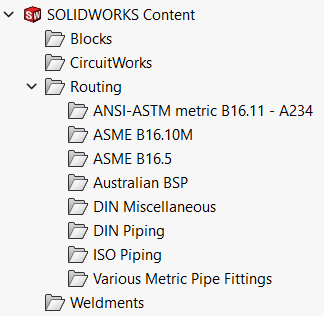
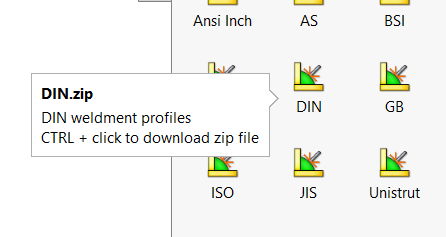
To download the other files, simply hold CTRL + click on the standard you want, and they will download into a zip file. Once downloaded, extract your zip file to your weldment profile directory and you’ll be all set. To change, move or set your directory to a specific Windows folder location, simply go to Tools > Options > File Locations > Weldment Profiles, as shown:
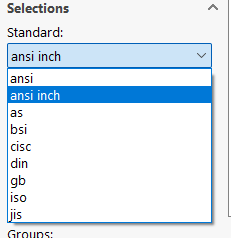
After downloading and extracting the files to your weldment profile directory, you’ll then see the various weldment profiles available to you when creating new structural members or editing existing designs.
More Profiles Available for Free
SOLIDWORKS isn’t the only place where you can find free downloads! Many suppliers actually provide their profiles on 3D Content Central. This is a free service for locating, configuring, downloading, and requesting 2D and 3D parts and assemblies, 2D blocks, library features, and macros – many specifically for SOLIDWORKS.
Related Links
Certified SOLIDWORKS Services available from Javelin
Javelin can help you to:
Posts related to 'SOLIDWORKS Weldment Profiles for Free'
