


How to Use Patterns in SOLIDWORKS

Article by Lily Bar updated June 3, 2026
Article
Learning patterns in SOLIDWORKS can be a useful tool for users who want to avoid repetitive sketches and extrusions. It is a great time-saving tool and has many types of patterning techniques to choose from.
What Are Patterns in SOLIDWORKS?
Patterns are used when you need to reuse geometry, and the instances have no variation. In SOLIDWORKS, the terms used for patterning are the seed feature and pattern instances. The seed is the original geometry, while the instances are only copies of the seed. If the seed changes, the instances will as well.
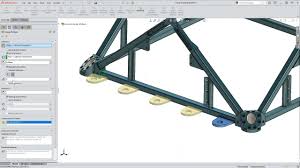
Example use of patterns in SOLIDWORKS
The most useful types of patterns that SOLIDWORKS contains include linear, circular, sketch-driven patterns, and mirroring.
Linear Patterns
With linear patterns, you can pattern geometries such as bodies, features, planes, and more in one or two directions. The spacing and number of instances can be chosen by you, or you may select the up to reference button.
To create a linear pattern:
- Switch to the Features tab of the SOLIDWORKS CommandManager.
- Select the Linear Pattern command.

 Linear pattern in the Features tab
 - Define the pattern direction, spacing, and number of instances.
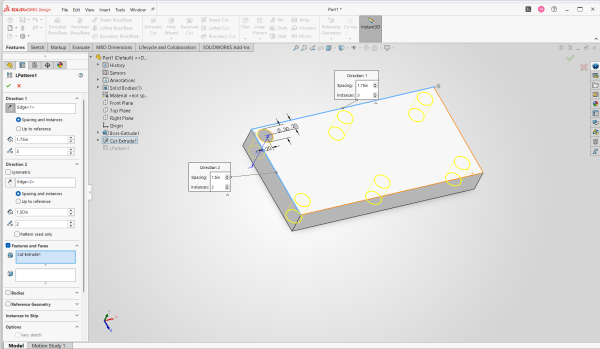 Choose your spacing and instances
 - Define either a feature mirror or a body mirror.
- Click the green check to accept the pattern.
Skipping instances is also made possible by SOLIDWORKS; to do so, move down to the instances to skip tab, select the space you want to skip, and it will disappear from the preview. Patterning the seed only will pattern in the directions you pick exclusively, meaning two lines of features.
Circular Patterns
The circular pattern can create instances around a center of rotation.
To create a circular pattern:
- Switch to the Features tab of the SOLIDWORKS CommandManager.
- Select the dropdown next to the Linear Pattern command and choose Circular Pattern.
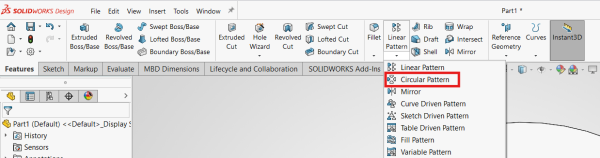 Circular Pattern in the Features tab
 - Select the geometry you want to pattern. This can be easily done with the flyout Feature Tree.
- Define the pattern direction, spacing, and number of instances.
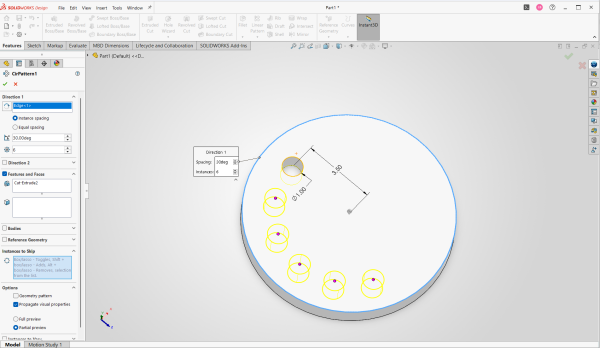 Creating a circular pattern using instance spacing
 - Optionally, define the instances to skip.
- Click the green check to accept the pattern.
Sketch Driven Patterns
Sketch driven patterns are made first by sketching points, creating the pattern based on those points. It is useful when angles and spacing are not applicable.
To create a sketch driven pattern:
- Switch to the Features tab of the SOLIDWORKS CommandManager.
- Select the dropdown next to the Linear Pattern command and choose Sketch Driven Pattern.
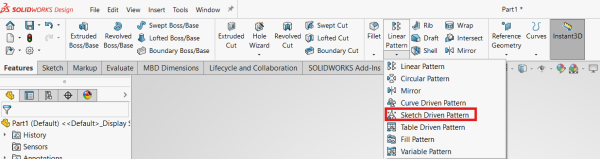 Sketch Driven Pattern in the Features tab
 - Select the geometry you want to pattern. This can be easily done with the flyout Feature Tree.
- Select the existing sketch containing points to define the pattern instances.
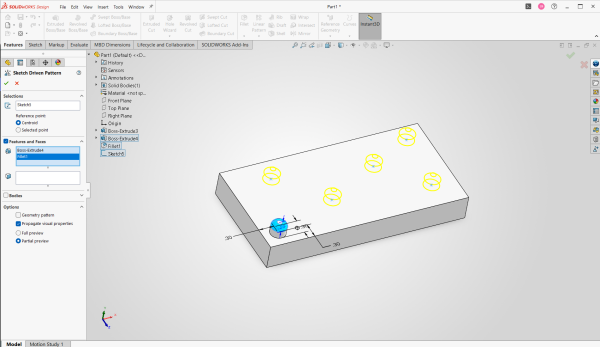 An example of a sketch driven pattern
 - Click the green check to accept the pattern.
Mirroring
Mirrors are best for a case when you only need one additional instance and where you can leverage symmetry. You can mirror a feature across a plane, face, or line.
To use a mirror:
- Switch to the Features tab of the SOLIDWORKS CommandManager.
- Select the dropdown next to the Linear Pattern command and choose Mirror.
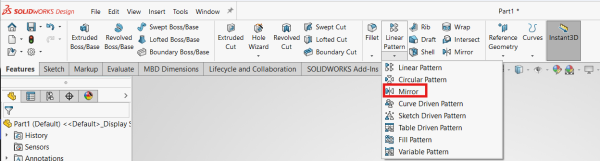 Mirror in the Features tab
 - Select the geometry you want to mirror. This can be easily done with the flyout Feature Tree.
- Define the primary and secondary mirror planes, if required, using a line, face, or existing plane.
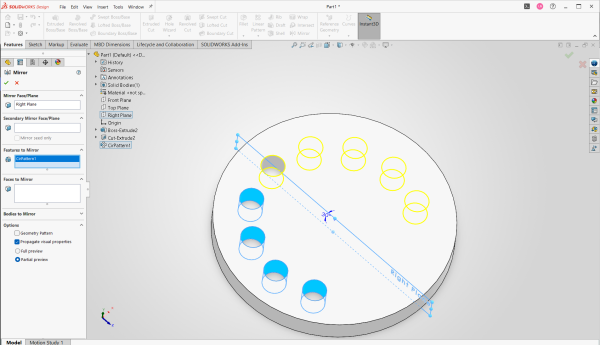 Mirroring the circular pattern across the right plane
 - Click the green check to accept the pattern.
More Patterning Content
If you want to learn more specifics about patterning, including advanced patterning techniques, visit the SOLIDWORKS pattern archives. You will find a variety of helpful Tech Tips related to patterns in SOLIDWORKS.
For a deeper dive into patterns and how to effectively use them in your designs, consider an instructor-led training course. These courses cover everything from SOLIDWORKS basics to advanced, specialized training topics.
To view the upcoming training course calendar to find a class that fits your needs, click here.
Related Links
Certified SOLIDWORKS Services available from Javelin
Javelin can help you to:
Posts related to 'How to Use Patterns in SOLIDWORKS'
