


Blog Tag
Showing 46-60 of 89.
SOLIDWORKS Part
SOLIDWORKS Part features tech tips and best practices


Why is my SOLIDWORKS Sketch Pattern Under Defined?
In general, it’s good practice to create a Feature Pattern rather than creating all of the geometry in a single…

SOLIDWORKS 2017 has increased Feature Pattern performance
SOLIDWORKS 2017 has increased Feature Pattern performance! Linear pattern feature performance is improved for SOLIDWORKS 2017, especially when the number…

SOLIDWORKS 2017 Dynamic Reference Visualization Redesign
In SOLIDWORKS 2017 the Dynamic Reference Visualization has been redesigned! Dynamic reference arrows have been redesigned to improve clarity in the…
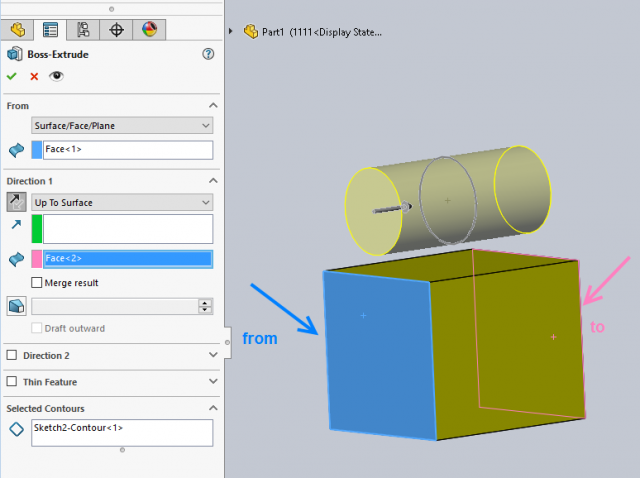
SOLIDWORKS 2017 Extrude Boss/Cut Feature Enhanced
Prior to SOLIDWORKS 2017, extruding a boss or a cut feature from/to a face required the sketch to project within…

SOLIDWORKS 2017 Tree Display options reduce visual clutter in the FeatureManager
With all of the information that the SOLIDWORKS feature manager design tree is able to relay to users, enhancements that…

SOLIDWORKS Sweep Profile Selection Enhanced to include Faces, Edges, & Curves
The SOLIDWORKS Sweep feature has been improving over the years; unlike Extrude the Sweep feature requires at least two sketches to be…

SOLIDWORKS 2017 Chamfer Enhancements
If you have been working with SOLIDWORKS for a while, you have likely noticed the lack of attention that the…

SOLIDWORKS 2017 Convert an existing Chamfer to a Fillet & back again!
Using the “Offset Face” or “Face-Face” chamfer options within SOLIDWORKS 2017, grants us an additional ability! We can now swap back…

How to Copy and Paste SOLIDWORKS Features
Let’s say you’ve created a feature in SOLIDWORKS that you really like. If you really like something, you want more…

How to create a SOLIDWORKS Hole Wizard Favorite
If you frequently use a particular Hole Wizard hole, instead of re-entering the parameters each time you launch the Hole Wizard…

Rename SOLIDWORKS Files directly from the FeatureManager Design Tree
A favorite feature of ours that has come along in the 2016 release is an option that will allow us…

SOLIDWORKS Dynamic MIRROR | ЯOЯЯIM
See what I did there? I used Character Map to get a backwards R, then used symmetric letters to make…

SOLIDWORKS 2016 Sweep in Two Directions
Sometimes it’s much easier to generate a profile sketch for a sweep feature somewhere along the path. For example if the…

SOLIDWORKS 2016 Curvature Continuous Edge Fillets – Constant or Variable Size
SOLIDWORKS 2016 now includes the option to set your edge fillets (constant or variable size) to be Curvature Continuous Edge…