


Automatically Naming SOLIDWORKS Files with Serial Number

Article by Izaaz Sheikh updated June 22, 2013
Article
In SOLIDWORKS PDM, files can be automatically named or renamed when a file is saved. This setting can only be set when the ‘Admin’ user is logged in and this setting change needs to only be done once on one computer due to the setting being tied directly to the PDM vault settings. This feature is only available in SOLIDWORKS PDM Professional.
Firstly, to set up a serial number in SOLIDWORKS PDM, right click the Serial Number node.

Serial Number setting in Administration Tool
The Format of the serial number can set from the pull-down and by manually adding static text. The ‘Next counter Value‘ can also be set

Serial Number Settings
Once the Serial Number has been created, we can now set the serial number settings inside of SolidWorks.
Before opening SOLIDWORKS, ensure you are logged into SOLIDWORKS PDM Vault View as admin (System Administrator)
Open SOLIDWORKS (SOLIDWORKS Design in 2026) and open Tools > SOLIDWORKS PDM > Options. In older versions of SOLIDWORKS, it is through Enterprise PDM > Options.
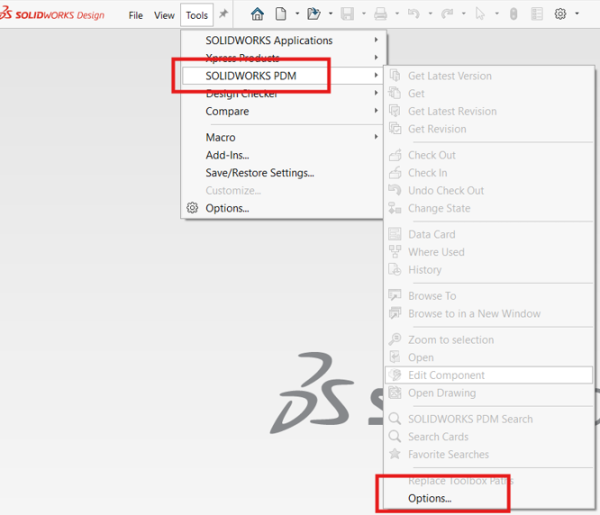
SOLIDWORKS PDM settings in SOLIDWORKS
Choose the Vault and Serial Number that will be used. If the Serial Number option is grayed, check to see if your logged in as ‘Admin’
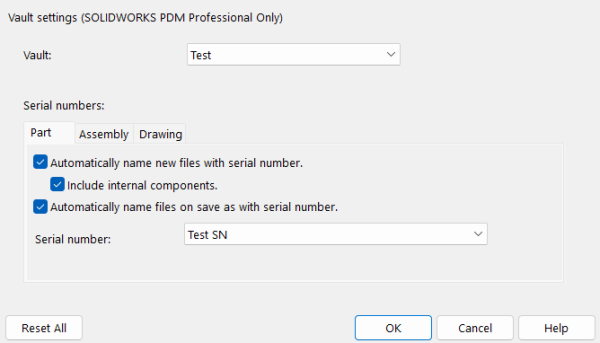
Serial Number Settings in SOLIDWORKS PDM Options
Serial Numbers can be used when creating a new file or doing a Save As on an existing file. A great feature here is that each SOLIDWORKS file type such as part, assembly, and drawing has their own settings. This way, different Serial Numbers can be assigned to each document type.
Related Links
Want to do more with SOLIDWORKS PDM?
Our Certified SOLIDWORKS PDM Experts can help you to:
Posts related to 'Automatically Naming SOLIDWORKS Files with Serial Number'
