


Understanding SOLIDWORKS PDM Private State Files

Article by Karanvir Singh updated March 10, 2021
Article
Private state files are not local files — their records exist in the vault database, but are only visible to the special PDM administrator or users granted explicit permissions (SOLIDWORKS PDM Professional only). Read on for a deeper dive.
What are Private State Files?
According to the SOLIDWORKS PDM Help, “Private State files are files that other users have added to the vault, but have not yet checked in”.
A Private State file is one that has been added to the vault but not yet checked in — meaning a database record exists, but the file has no workflow state and is not stored on the archive server. It appears in italic text with ‘Private State’ in the state column, and only the user who added it can view or work on it.
Private state files are identified by italic text, and ‘Private State’ is displayed in the state column. However, this is visible to other users than the user who added it only if they have the permission to view private state files.
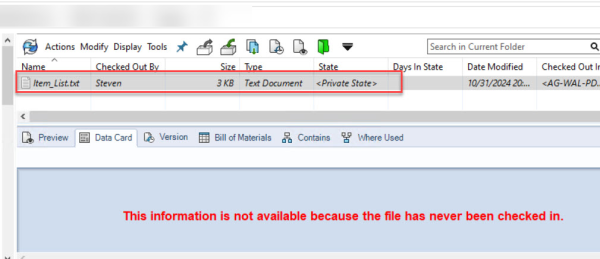
The user who added the file will simply view it as any file that is currently checked out by the user. The moment the user who added the file does the initial check in, the file no longer stays a private state file.
Permissions Involved With Private State Files
There are two sets of permissions, as described below, that govern the visibility and access of Private State Files:
- “May see contents of private state files”: Users with the ‘May see files before the initial check-in (Private State)’ folder permission can list and search for private state files, but preview is unavailable — the tab displays a message indicating the file has never been checked in.

File operations such as Get and Open are restricted on another user’s private state files unless the ‘May see contents of private state file’ permission is granted. Without it, visibility is limited to the file name and the user who added it.
- “May see contents of private state file”: Users with the ‘May see contents of private state file’ permission — including Admin — can view file details like the data card and perform file operations. However, only version (1/1) exists on the archive server; any local modifications made while the file is in private state are not accessible to others.
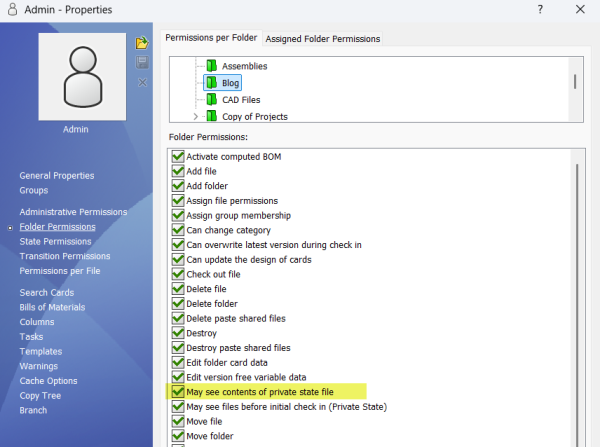
Permission to See Contents Of Private State Files
Private State File Limitations
Few PDM operations can be performed on these Private State files.
- Private State files cannot be transitioned as they are not a part of any PDM Workflow.
- There is no history for Private State files, so if you need to get an earlier version of a file in order to recover from unwanted changes, you cannot do this.
- Private state files containing CAD references have no reference information in the database until checked in. As a result, the Contains, Where Used, and BOM tabs remain unavailable until the file is checked in.
- Further, while Copy and Move Tree are available for Private State files, referenced files will not be included with the copy or move tree.

Searching Private State Files
There is a hidden functionality in the PDM Complete Search card where we can enable the functionality to include the private state files in our search criterion with a simple checkbox, as shown below.

Including Private State Files in the Search
This functionality does not exist by default and has to be added by editing the Complete Search Card from the Administration Tool. This adds to the benefit of getting a result of all the private state files that exist inside the vault. However, only the user with the permission to view private state files can view the search results.
Related Links
Want to do more with SOLIDWORKS PDM?
Our Certified SOLIDWORKS PDM Experts can help you to:
Posts related to 'Understanding SOLIDWORKS PDM Private State Files'
