







What is DriveWorks?
DriveWorks is a Design Automation and Sales Configuration tool used by manufacturing companies large and small.
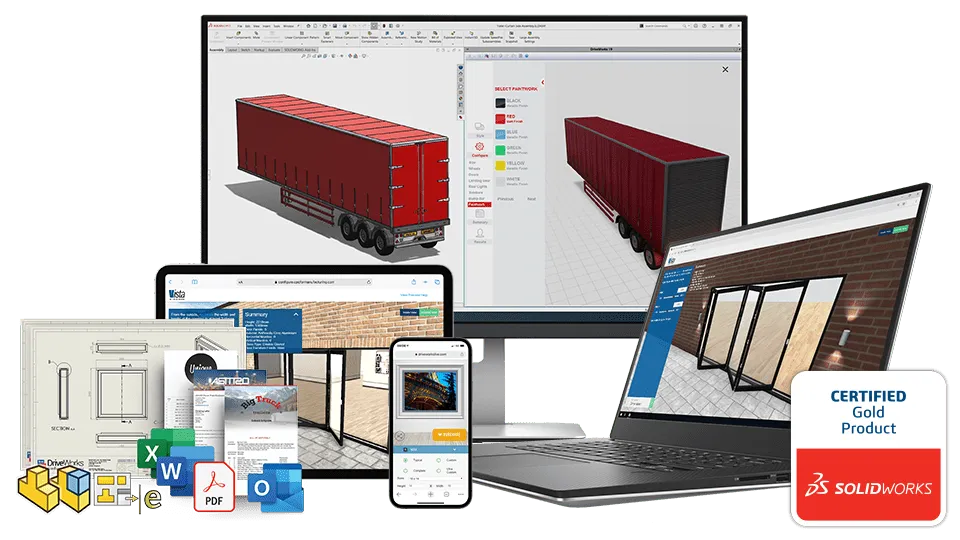
Are your designs the “same but different”? Product customization is more prevalent than ever, and DriveWorks is here to make the entire process easier than ever. Built from the ground up for manufacturing companies, DriveWorks allows you to digitize product specification sheets, and automate pricing, quoting, CAD design, and more!
If you’re looking to build an internal or external product configurator, automate sales specification and pricing for your sales teams, distributors, and even customers; DriveWorks software is the ultimate choice!

Monthly DriveWorks Webinars
Discover the Key Features of DriveWorks

Automate SOLIDWORKS
Automatically create order-specific SOLIDWORKS® parts, assemblies, and drawings. Capture and reuse design, manufacturing, and cost estimation knowledge to deliver custom products faster and with greater accuracy, without using complex macros, design tables, or configurations.

3D Product Configurator
Use guided selling and 3D visualizations to help users configure complex custom products accurately. Build an online configurator with DriveWorks to stay ahead of the competition, reduce costs, and win more business.

Configure, Price, Quote (CPQ)
Configure, price, and quote complex custom products on any device, anywhere.
Guided selling ensures sales teams and distributors always meet customer requirements faster with valid configurations that can be manufactured. Remove the need to consult with engineering before quoting product configurations and accelerate sales.
Demo
Get to know DriveWorks
DriveWorks FAQs
Example DriveWorks Online Product Configurator
Browse products embedded in a multi-page website, configure custom and standard products, add them to your basket and request a quote.
DriveWorks Features
Automation for everyone

Use rules to automate SOLIDWORKS Part, Assembly and Drawing creation
DriveWorks is an easy-to-use design automation solution that allows anyone to quickly and easily create and configure custom products inside SOLIDWORKS.
- Capture and re-use your design knowledge
- Incorporate design rules to reduce errors and rework, and improve product quality
- Automate repetitive tasks to reduce design time
- Free up design engineers to focus on improving product quality and designing new products
- Create sales proposals quickly, win more business, and increase profit margins
Create Online Product Configurators
Enable your customers to configure their product selection, get instant quotes, and even place their orders straight from your website. Enable sales teams, distributors, and customers to configure custom products on any device, anywhere from a secure portal. Connect sales and manufacturing to reduce costs, errors, and lead time.
- Meet the increasing demand for custom products to gain a competitive edge.
- Generate quotes in record time.
- Reduce the cost of custom designs.
- As an online tool you will allow anyone to access the product configurator
- Present your configurable products in a web browser as 3D interactive models rather than static 2D images.


Design Automation inside SOLIDWORKS
DriveWorks allows you to quickly and accurately capture your CAD design data and create multiple variations of your SOLIDWORKS parts, assemblies and drawings.
- Capture the dimensions, features and components you want to drive in SOLIDWORKS
- Rules-based file naming to control if DriveWorks creates new SOLIDWORKS® files or re-uses existing ones.
- Create dynamic, data-driven forms to input the values that drive your design
- Build design rules to drive your models using the values entered on a form
- DriveWorks integrates with SOLIDWORKS® PDM Professional and files can be automatically checked into the vault.
- Run the project again and again to create custom manufacturing files and quotes
Seamless integration with company systems
Learn how to easily share data between DriveWorks and other company systems including ERP, MRP and CRM with native SQL, REST API and ODBC integrations.
Data sharing between systems removes the need for manual data re-entry and the chance of mistakes. Always working with accurate data means better experiences for your team, your distributors and your customers.
DriveWorks Benefits
Easy to use software which will adapt to your business process
Design automation
Automating your design process lets you create custom designs quickly and efficiently. Automation is ideal for Same but Different design, where new orders or new products are based on a variation of your existing designs.
Automatically generate sales documents
Free up engineers from repetitive design tasks by automatically generating 2D and 3D drawings of your SOLIDWORKS CAD models, sales quotes, letters and manufacturing data.
Online product configurator
Implement an Online Product Configurator for your sales team, distributors and even customers to use. Use it to guide non-technical people through the custom product options available, provide a fast response to sales inquiries and configure accurate quotes quickly.
Anyone can configure your products
Whether your engineers and sales teams are in house, out in the field, or you work through dealers and distributors, a product configurator will let you create custom designs and a custom response quickly and professionally.
Javelin DriveWorks Capabilities
Javelin is an award winning DriveWorks reseller, able to provide technical services and training. Learn how we have helped clients implement DriveWorks software »


DriveWorks Resources
Learn more about what DriveWorks can do for your business
DriveWorks-based SmartQuote system helps Thordon Bearings manage international dealer network
Testimonials
“The time we are gaining from freeing up the engineering team is now used proactively in research and development.”.
— Luke Malpas, Director of Engineering Automation, DON-BUR Engineering
“How do we keep our prices down and satisfy our customers? We continue to look for different ways to do things. We find a better way to do it”
— David Munschauer, President of ATECH-SEH.
“Our partners simply fill out a form on the internet, which then automatically generates all necessary documents. We started the implementation with a select group. By now, all our partners use the configurator, to their full satisfaction”
— Michel van Kerkhof, Head of Innovations at MHB
“Before using DriveWorks we would create 20 quotes in a month, now we can do 20 in a day. The process in the past was labor intensive as prices need to be calculated each time and drawings all had to be prepared manually.”
— David Martin, Managing Director, Elite Balustrade
“[We’ve] tried many things in the past, like creating [a] standard library of drawings, custom programming etc., when software like this was not available. Rules-based automation is the best, easy-to-use, scalable solution of them all”.
— Shaji Shereef, Director of Engineering Automation, FleetwoodGoldcoWyard
SOLIDWORKS Services included
Improve your performance and productivity with Javelin services

Technical Support
With SOLIDWORKS Subscription Service, you have access to extensive help from our SOLIDWORKS experts. Which will enhance your software investment and guide you through development challenges.
Benefits
- Live Technical Support from our certified support team.
- Remote Support to solve your technical issue right on your machine.
- Regular Communication of software updates and technical tips and tricks.

Upgrades & Resources
Enjoy the latest version of your software and direct access to a comprehensive library of drawings, parts, assemblies, and features contributed by users around the globe.
Advantages
- Automatic Upgrades to the most Up-to-date Version of your SOLIDWORKS software.
- FREE access to the SOLIDWORKS Customer Portal for Macros, Documentation, and the ability to submit Enhancement Requests.
- Full access to the SOLIDWORKS Knowledge Base for Articles, Tech Tips, and Best Practices.

Online Training & Certification
A SolidProfessor and a MySolidWorks online account is included with your subscription service where you can get answers, stay current, and sharpen your design skills with online training:
Features
- SolidProfessor includes 15K+ online tutorial videos.
- FREE access to SOLIDWORKS testing and certification to help you become a Certified SOLIDWORKS Associate (CSWA) or Professional (CSWP).
Test Drive a Configurator
Try a DriveWorks powered Online 3D Configurator now