


Unable to Connect to Collaborative Server SOLIDWORKS Electrical Error!

Article by Justin Flett updated June 6, 2015
Article
Have you ever run into the Unable to connect to Collaborative Server error when trying to launch SOLIDWORKS Electrical?

This error message occurs most often if the collaborative server service is not running. Clicking OK will bring you to the SOLIDWORKS Electrical interface but will render the software unusable.
Solving the issue
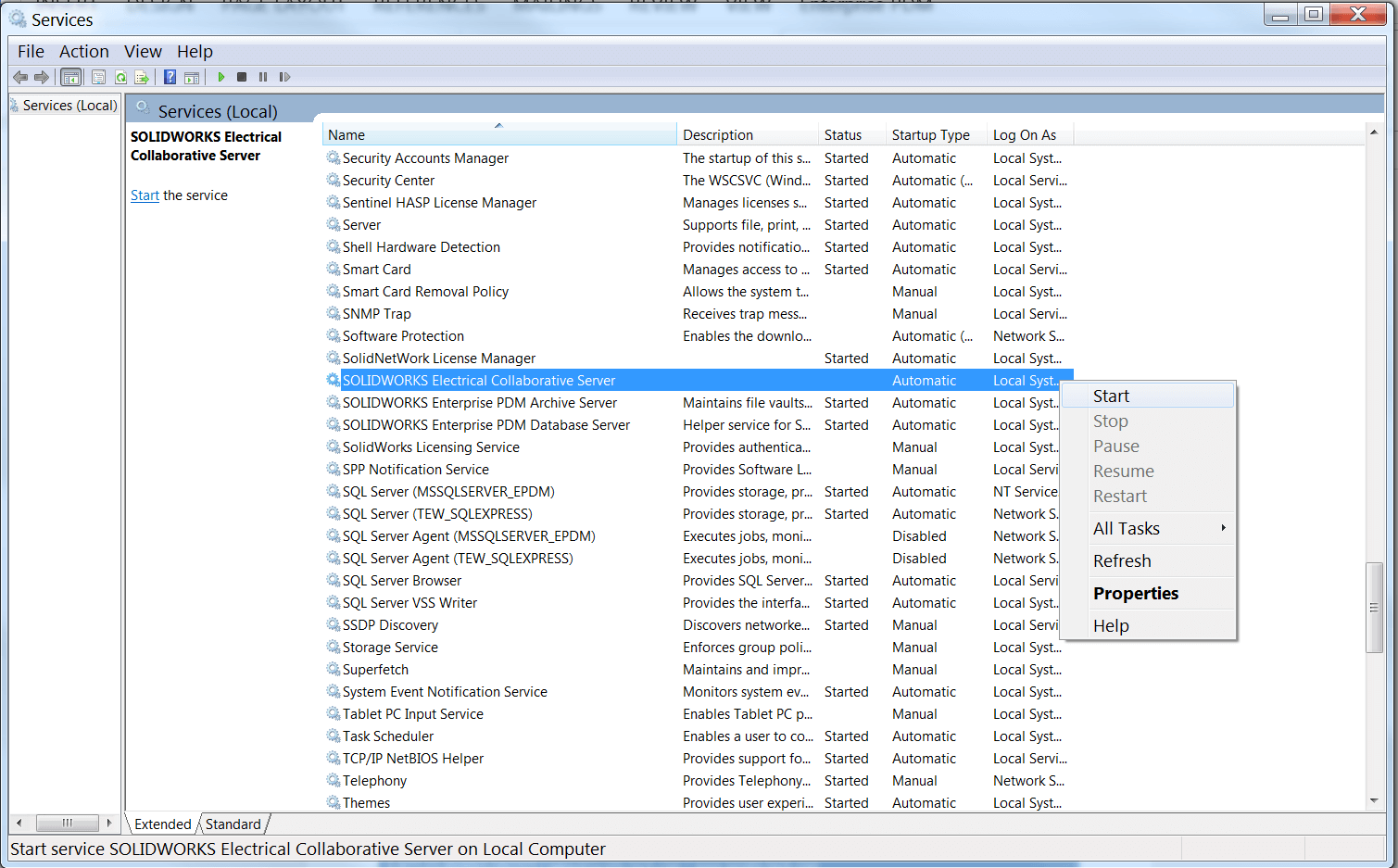
This issue can generally be resolved quite quickly by checking the status of the collaborative server service. We can check the service status by using the Windows Services panel found by searching “Services” within the Windows Start search bar.

Within the services panel we can scroll to the SOLIDWORKS Electrical Collaborative Server service and notice that under “Status” the service is not started. From here we simply right-click on the service and select Start, and ensure the status has changed to “Started”.
Finally, close and reopen SOLIDWORKS Electrical. The error should be resolved and we can continue our electrical design work!
Related Links
Get Certified SOLIDWORKS Electrical Services
Our Certified Electrical Experts can help you to:
Posts related to 'Unable to Connect to Collaborative Server SOLIDWORKS Electrical Error!'
