


Javelin / TriMech Author

Delvin Masilamani
PLC I/O Wire numbering in SolidWorks Electrical
 By Delvin Masilamani on March 30, 2014
While working with PLCs it is typical for designers to use the Device I/O as a part of their numbering standard. This tech tip explains how this style of wire numbering can be achieved while working in SolidWorks Electrical. Create a new PLC mark by…
How to Build a Symbol in SOLIDWORKS Electrical
By Delvin Masilamani on March 28, 2014
Using an intelligent tool makes your design process more efficient. With SolidWorks Electrical in a few simple steps, you can build your very own symbol. The article below answers the question of “How do I build a Symbol?”
SolidWorks Electrical 2014: Wipe out feature
By Delvin Masilamani on October 3, 2013
If you come across a situation where you would like to hide certain features or lines in your designs, SolidWorks Electrical 2014 now provides you as the user the option to Wipe out this entity. This feature simply hides the unwanted content from your audience….
SolidWorks Electrical 2014: Search Feature in Component Tree
By Delvin Masilamani on October 2, 2013
When dealing with a large project, it is often difficult to search for components in the Components Browser. SolidWorks Electrical 2014 has now introduced this search feature to help with your Electrical Designs. Whats New Cont’d….
SolidWorks Electrical 2014: Displaying Wire Color Labels
By Delvin Masilamani on October 1, 2013
This much awaited feature now, comes as a default in the Electrical 2014. When wire connections are made, a user has the ability to display the wire color label on the wires by simply selecting the wire and right-clicking to “Show Label”. …
SolidWorks Electrical 2014: Report Features
By Delvin Masilamani on September 30, 2013
With the product enhancements in 2014, the Report Manager in SolidWorks Electrical now gives you more flexibility in the setup of Export for Text files. As an End user, you can customize the layout of the exports generated in text. These files generated can now…
SolidWorks Electrical 2014: Sorting Terminals
By Delvin Masilamani on September 29, 2013
For you adventurous Electrical users, the 2014 version of the product had a new highlight added to it’s features. Sorting of the terminals is now a part of the Edit Terminal Strip Plan. Whats New Cont’d….
SolidWorks Electrical 2014: Inheriting the Location or Function
By Delvin Masilamani on September 28, 2013
In the 2014 Version of SolidWorks Electrical, now the user is prompted if they want the component to inherit the Location or Function of the Outline assigned. Steps: 1) Select Location or Function Outline 2) Draw the outline around the component 3) Select the Function…
SolidWorks Electrical 2014: What’s New?
By Delvin Masilamani on September 19, 2013
Last year when SolidWorks announced it’s Electrical Package, it had every one intrigued with the hope & possibility of unifying the overall design process. After crossing into uncharted territory, it merged the Electrical Schematic world with the Mechanical 3D world and created a robust product. The…
SolidWorks Electrical: Working With Dual Column Title Blocks
By Delvin Masilamani on August 2, 2013
Shao Liu regularly contributes to the documentation for our Electrical Team here at Javelin Technologies. The article below is a useful section from his work. Creating customized title block is convenient for a user who wishes to automate drawing information on schematic diagrams. When starting…
SolidWorks Electrical : Importing Components from a Bill of Material
By Delvin Masilamani on July 26, 2013
Shao Liu regularly contributes to the documentation for our Electrical Team here at Javelin Technologies. The article below is a useful section from his work. The import wizard in SolidWorks Electrical allows for bulk loading components with ease. Under Manufacturer parts manager select Import. Then select…
SolidWorks Electrical : Cross Reference settings on a Title Block
By Delvin Masilamani on July 19, 2013
Setting up a Title Blocks requires that every detail of information is laid out properly. There are 2 ways that the cross references can be automatically placed on a Drawing sheet. However this depends on the Title Block settings. In the Title Block Manager, Select…
SolidWorks Electrical: Creating Custom Connectors
By Delvin Masilamani on July 9, 2013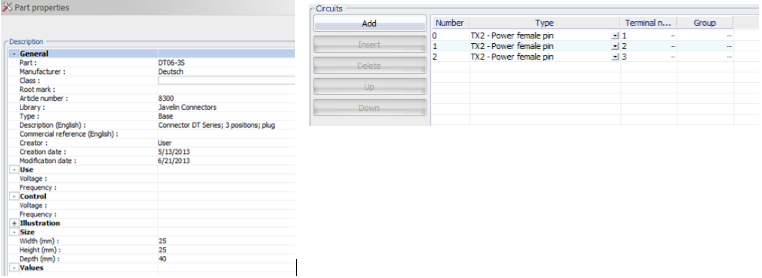
Shao Liu regularly contributes to the documentation for our Electrical Team here at Javelin Technologies. The article below is a useful section from his work. This article will demonstrate how to correctly set up the connector component in order to display cable and wires that…
SolidWorks Electrical: The Archive Environment, Part 2
By Delvin Masilamani on July 3, 2013
Shao Liu regularly contributes to the documentation for our Electrical Team here at Javelin Technologies. The article below is a useful section from his work. SolidWorks Electrical has a powerful SQL back end and uses an archiving process for packaging all parts or project information. The…
SolidWorks Electrical: The Archive Environment, Part 1
By Delvin Masilamani on June 28, 2013
Shao Liu regularly contributes to the documentation for our Electrical Team here at Javelin Technologies. The article below is a useful section from his work. SolidWorks Electrical has a powerful SQL back end and uses an archiving process for packaging all parts or project information. When…