


Javelin / TriMech Author

Joe Medeiros, CSWE
Using Copy & Paste to Create Similar States & Transitions in SOLIDWORKS EPDM Workflow
 By Joe Medeiros, CSWE on December 2, 2014
States and transitions, have a large number of settings, which include permissions, conditions, actions and notifications. Having to manually duplicate settings between states and transitions can be time consuming, and there is always the chance of forgetting to recreate a setting. similar states and transitions…
Transition Action Order in SOLIDWORKS EPDM
By Joe Medeiros, CSWE on November 28, 2014
While the order in which the transition actions are executed should not impact the behavior of the action, my experiences has shown this is not the case. In a transition where the revision is to be set, the order in which the actions are executed…
Convert SOLIDWORKS Workgroup PDM Files Task Fails to Launch after Logging In
By Joe Medeiros, CSWE on November 24, 2014
When running the Convert Workgroup PDM Files task, from SolidWorks Task Scheduler. If you cannot proceed past login screen, you need to install the SolidWorks API component. From the windows control panel, select Uninstall a program. Right click on the SolidWorks installation and choose Change. …
SOLIDWORKS EPDM 2015 Licensing
By Joe Medeiros, CSWE on November 17, 2014
SOLIDWORKS Enterprise PDM 2015 has moved to activation based licensing, similar to what has been used by SOLIDWORKS since 2010. This activation based licensing eliminates the need to get a license file, with each major release. Along with an Archive Server and a Database Server, a…
EPDM – Exploring Reference Dialog
By Joe Medeiros, CSWE on November 4, 2014
Many important settings are controlled by Reference Dialog, but many do not know where to find it, or what options are controlled in this area.
SOLIDWORKS EPDM – Update all configurations does not Update Sheet Tabs
By Joe Medeiros, CSWE on October 20, 2014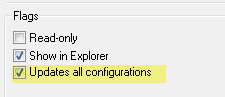
Update all configurations flag in a data card will set the same value for all configurations. This value will be shown in all configuration tabs in the data card. Drawing sheets do not have sheet-specific custom properties. Therefore, custom properties will only display on the @…
SOLIDWORKS EPDM – Filter Workflow using Transition Conditions
By Joe Medeiros, CSWE on October 15, 2014
Using Transition Conditions, files can be pushed to a branch of workflow, or into a different workflow. This simple workflow illustrates how we can filter which destination workflow a file will enter, based on input from a file data card. In this example file data card,…
SOLIDWORKS Enterprise PDM – Chinese Characters in File Lead to File not Found
By Joe Medeiros, CSWE on September 30, 2014
On a system where Chinese has NOT been installed for the operating system, Windows Explorer may replace any Chinese characters, with characters that cannot be read by SolidWorks Enterprise PDM. The only software related fix for this would be to install a Chinese version of your operating system,…
SOLIDWORKS EPDM – Why does the Date Format differ from today’s date and other dates?
By Joe Medeiros, CSWE on September 25, 2014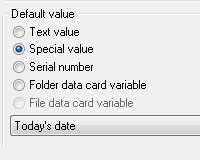
When the Special Value “Today’s Date” is used in the control properties of a data card, the date is drawn from Windows and the format is defined by Windows. Other dates use the date format specified during the creation of the EPDM vault. This means that the formats…
SOLIDWORKS EPDM – Displaying State as Note in a Drawing
By Joe Medeiros, CSWE on September 23, 2014
The state of a file can be displayed in a drawing by using Transition actions, to assign a value to variable. A custom property mapped to this variable, can then be linked to a note in a drawing. In the drawing data card, a control…
SolidWorks EPDM – Desktop Shortcut to Local Vault View
By Joe Medeiros, CSWE on September 2, 2014
Below are two methods for creating a SolidWorks EPDM desktop shortcut to local vault view. Method 1: From the Navigation Pane in Windows Explorer, drag the vault icon onto the Windows Desktop. Please note, Method 1 will not work on Windows 10, please use Method…
SolidWorks EPDM – File & Folder Panel not Visible in Local Vault View
By Joe Medeiros, CSWE on August 21, 2014
On rare occasions, after creating a local vault view, the file and folder panel appears to missing. This can be the result of the bottom panel being stretched, to the top of the local vault view. By clicking on the white bar below the pull-down, you…
SolidWorks EPDM – Ignore Permissions from Previous States
By Joe Medeiros, CSWE on August 20, 2014
As a file passes through a workflow, permissions are inherited from previous states. This can result in users or groups, who would normally have certain permissions in particular state, not having those permissions for some files in that state. For instance a user or group…
Is that SOLIDWORKS PDM Access Error or Poor Vault Performance a sign of a Full Drive?
By Joe Medeiros, CSWE on August 18, 2014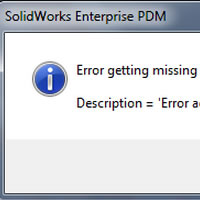
When access errors start to occur,the cause may not be a connection issue between the client and the server. Even though the logs seem to indicate that the error is with communications. The actual issue may be a full drive. There are a number of…
SOLIDWORKS PDM Creating a Client Administrative Image
By Joe Medeiros, CSWE on August 11, 2014
A SOLIDWORKS Administrative Image can be created in order to deploy a SOLIDWORKS PDM client installation, with preset options. From Windows Start enter “Run” Enter the location of the SOLIDWORKS PDM setup.exe. The location will vary depending on whether you are installing the client from the original DVD, or…