


Javelin / TriMech Author

Joe Medeiros, CSWE
EPDM – Support for Virtual Environments and Storage Appliances (NAS and SAN)
 By Joe Medeiros, CSWE on October 16, 2013
Recently I have come across issues with NAS drives being used for the SolidWorks Enterprise PDM Archive. If you are considering using these appliances, please review the below statement, from SolidWorks, first. Due to the many configurations and wide variety of virtual applications, Network Attached Storage (NAS), and Storage Area Network (SAN) appliances, it is not possible for SolidWorks to replicate all the permutations. SolidWorks therefore cannot certify the use of SolidWorks products operating in a virtual environment and on NAS and SAN devices. The Enterprise PDM Vault, Workgroup Vault, and SNL license servers may operate without issue in these environments, however such configurations are unsupported. Known Issues The use of replication capabilities available with NAS and SAN devises may interfere with the Enterprise PDM Archive server replication. Virtual…

Note: The information contained in this article applies to SolidWorks 2013 and earlier versions. Next week we will show you how an extremely powerful new tool introduced by SolidWorks 2014 empowers users to replace sketch entities without breaking relations downstream. After opening an assembly, mate…
Destroy Deleted Files to Avoid Duplicate File Errors in SOLIDWORKS PDM
By Joe Medeiros, CSWE on September 6, 2013
You attempt to check in a SOLIDWORKS PDM file, but you receive a message that ‘a file with this name already exists in the vault’. You perform a search and cannot find this file?! This can happen when a file with the same name has…
EPDM – SolidWorks Enterprise PDM resources
By Joe Medeiros, CSWE on September 5, 2013
Many questions regarding SolidWorks Enterprise PDM can be answered by a variety of resources. These resources are often the best place to find the information you seek. Unfortunately, there are a number of resources and knowing which one contains the information you seek can be difficult. I…
EPDM – BOM Permissions.
By Joe Medeiros, CSWE on September 4, 2013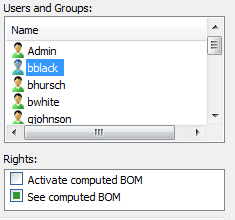
When creating a BOM, it is obvious that permissions need to be assigned in the Bill of Material – BOM dialogue box. What is often forgotten is to give the User/Group permissions to a BOM. Permissions should be set at the vault root…
EPDM – Troubleshooting Workflows – Conditions
By Joe Medeiros, CSWE on September 3, 2013
Troubleshooting Workflows can be complex and time consuming. In this article I have put together a few tips and tricks, that I have used in the past to resolve issues in Workflows relating to Conditions.
EPDM – Troubleshooting Workflows – User/Group Permissions
By Joe Medeiros, CSWE on August 30, 2013
Troubleshooting Workflows can be complex and time consuming. In this article I have put together a few tips and tricks, that I have used in the past to resolve permission issues in Workflows.
EPDM – Transition Action to run a Task
By Joe Medeiros, CSWE on August 28, 2013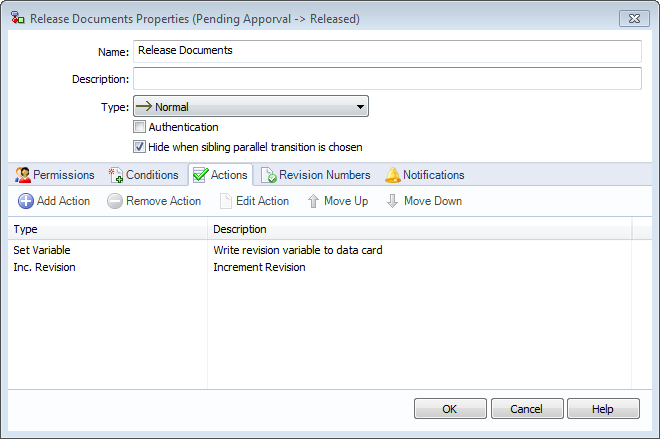
A Transition Action can be used to launch a Task. For instance, when a user changes the state of a drawing file, the file is saved as a PDF. In a workflow, double-click a transition to access the Transitions Properties and left-click the Actions tab.
EPDM – Accessing Local Vault View from Right Mouse Menu
By Joe Medeiros, CSWE on August 27, 2013
You have made some changes to your vault in SolidWorks Enterprise PDM Administration and would like to test those changes in Local Vault View. Right click on the vault and choose Explore. This will open the Local Vault View in offline mode. Just right-click on the…
EPDM – Performing a Back-up using SQL Server Management Studio
By Joe Medeiros, CSWE on August 22, 2013
A back-up can be created using Collect Support Information and this method is the easiest, but it may be faster and more convenient to create a back-up directly from SQL Server Management Studio.
SOLIDWORKS PDM Grey Folders and Files in the Local Vault View
By Joe Medeiros, CSWE on August 20, 2013
On occasion I get asked “why are there SOLIDWORKS PDM Grey Folders or files in the Local Vault View?” A grey folder or file is located in the cache of the Local Vault View, but is not present in the Archive vault. Here are reasons why…
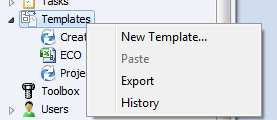
Templates can be used to create files from a master file (i.e. ECO’s), project folder structures and assign variables through a Template Card. This article will provide an overview of the main sections which can be used to create a template. Some sections will be…
PDM – Using “Link to content” to Define custom file properties in Excel
By Joe Medeiros, CSWE on June 15, 2013
With ECO’s/ECN’s, consistency of data input can be ensured by populating the ECO’s/ECN’s with Variables (Custom Properties) entered through Data Cards. These ECO’s/ECN’s are often in the form of a Word or Excel documents. In this article we will look look at creating a link between a property in…

The SQL server will use up memory based on available system resources. Once the memory is allocated it may not be released until the service is restarted. This is normal behavior for SQL and is not a memory leak. The maximum memory used can be controlled through SQL management studio….
EPDM – Indexing the Vault for Content Searching
By Joe Medeiros, CSWE on June 8, 2013When you index a vault archive, the search tool can use the content search option to search a document’s contents or properties. The first step is to set-up the Enterprise PDM index server, on the SQL Server hosting the vault database. The SolidWorks Enterprise PDM Installation Guide (found in the \Support\Guides\<lang> directory on the installation media) outlines how this is done. The keys steps include: Verifying the Microsoft Indexing Service installation Updating the vault database with the index server name Changing the database server login account Changing the SQL Server login account Adding index server filters Rescanning the index catalog Managing vault index catalogs. Once this is done, the SolidWorks Enterprise PDM Administration Guide (available from the Help pull-down in SolidWorks Enterprise PDM Administration, or it can be found in the \Support\Guides\<lang>directory on the installation media). Describes how…