


Javelin / TriMech Author

Joe Medeiros, CSWE
EPDM – Don’t Prompt to Save Read Only Referenced Documents.
 By Joe Medeiros, CSWE on June 2, 2013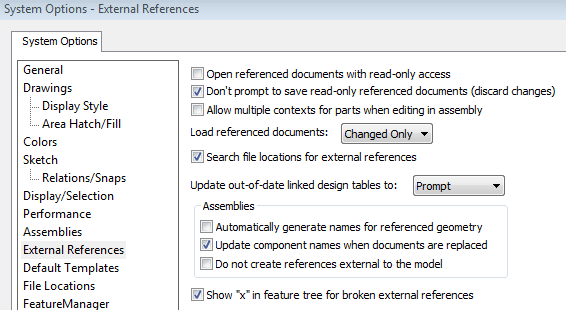
When saving a top level document you may be prompted to save any referenced documents that you do not own. This can result in being prompted multiple times to save these read-only documents. To avoid this, check Don’t prompt to save read-only referenced documents (discard changes). This option is…

This article is a continuation on my previous articles relating to linking Data Card Variables, to Office Properties. In this article we will look at how to create a Word or Excel template that can be used for ECO’s/ECN’s
EPDM – Saving the Event Viewer Log
By Joe Medeiros, CSWE on May 21, 2013
The EPDM user log file and the Archive Server log, can help to identify issues with EPDM, but some events are not captured by these logs. The Windows Application Log can often reveal issues not seen in the other logs.
General performance tips for SolidWorks Workgroup PDM
By Joe Medeiros, CSWE on May 13, 2013
Workgroup PDM performance is directly tied to the size of the Vault (a smaller size is better). For that use the SolidWorks Workgroup PDM VaultAdmin: Under the Project tab Archive old revisions and obsolete projects to reduce file size. In the Solidworks Workgroup PDM VaultAdmin,…
Setting Up the Solidworks Workgroup PDM Viewer
By Joe Medeiros, CSWE on May 10, 2013
UPDATED May 1, 2015 A license of SolidWorks Workgroup PDM Advanced Server is required for use of the Solidworks Workgroup PDM Viewer. The SolidWorks Workgroup PDM Advanced Server is not included with Solidworks Basic Professional or Premium and must be purchased separately. Once SolidWorks Workgroup PDM Advanced Server has been…
Start up time of the vault can be improved by running the Rebuild Vault option once or twice a month on the system where the vault was created.

You may receive the error “object doesn’t support this property or method” while viewing a document in Internet Explorer via the Workgroup PDM Viewer eDrawings View. This error is usually followed by a pop up warning stating: “this website wants to run the following add-on: ‘EModelView Module’…
EPDM – Adding a viewer to EPDM
By Joe Medeiros, CSWE on May 5, 2013
A default viewer can be assigned to preview selected file types from the Local Vault View. In the EPDM Admin Tool, either under the Group or User Node, right click on a group or user and select Settings. Select the Viewer tab and left click on Add. Under…
EPDM – “SolidWorks Rename” Creates Duplicate File in the Vault
By Joe Medeiros, CSWE on April 26, 2013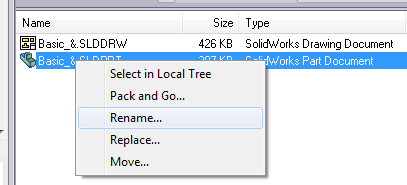
The SolidWorks rename option available from the SolidWorks Explorer or Windows Explorer will not handle renaming the vault file correctly as it only processes the locally cached copy of the file. It will not rename the vaulted file but create a brand new file. EPDM has built in support to…
Creative Element Power Tools: Free Cool Tool
By Joe Medeiros, CSWE on April 22, 2013
Creative Element Power Tools is a collection of productivity tools for Microsoft Windows 7, Windows Vista, Windows XP, Windows Server 2008, Windows Server 2003, and Windows 2000. http://creativelement.com/powertools/ Some of my favorite tools are: Power Rename: Rename multiple files in one step Copy or Move…
EPDM – Multi-Line Edit Box Character Limit
By Joe Medeiros, CSWE on April 19, 2013The Character limit that can be entered into a multi-line Edit box, of a data card is 2^20- 1 (1,073,741,823), but the custom property character limit of a program may have a smaller upper limit. For example in SolidWorks the upper limit is 1000 characters, while in Microsoft Office it is 256 characters. Adding more characters then the limit will result in a truncated custom property value.
EPDM – Enabling the eDrawings User Interface in the Explorer Preview Window
By Joe Medeiros, CSWE on April 17, 2013
For increased performance, the eDrawings User Interface is disabled in the Explorer preview window. To enable the eDrawings User Interface left click in the preview window. The eDrawings Toolbar can be displayed selecting “Show full UI in Solidworks preview” from Display Options.
EPDM – Copying items Between Vaults
By Joe Medeiros, CSWE on April 13, 2013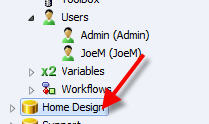
Items on one vault can be copied by drag and drop, to another vault. In the originating vault, left click on the item you want to copy and drop it onto the target vault.
Single Feature for Hole Wizard Hole of the Same Size
By Joe Medeiros, CSWE on April 10, 2013
Often, one of the many patterning tools available inside of SolidWorks, is used to create additional instances of a Hole Wizard feature. The resulting instances will update correctly when the Hole Wizard feature is changed, but this method will add additional features to the Feature Manager. Long…
EPDM – Updating Broken File References
By Joe Medeiros, CSWE on April 2, 2013
Sometimes when files are moved, renamed or deleted, file references can be broken. Update References can be used to re-establish the file references.