


Blog Category
Showing 16-30 of 227.
SOLIDWORKS Electrical
Discover SOLIDWORKS Electrical tech tips and tutorials from our team of certified electrical experts
How to Filter Reports in SOLIDWORKS Electrical
 By Danish Butt on July 10, 2026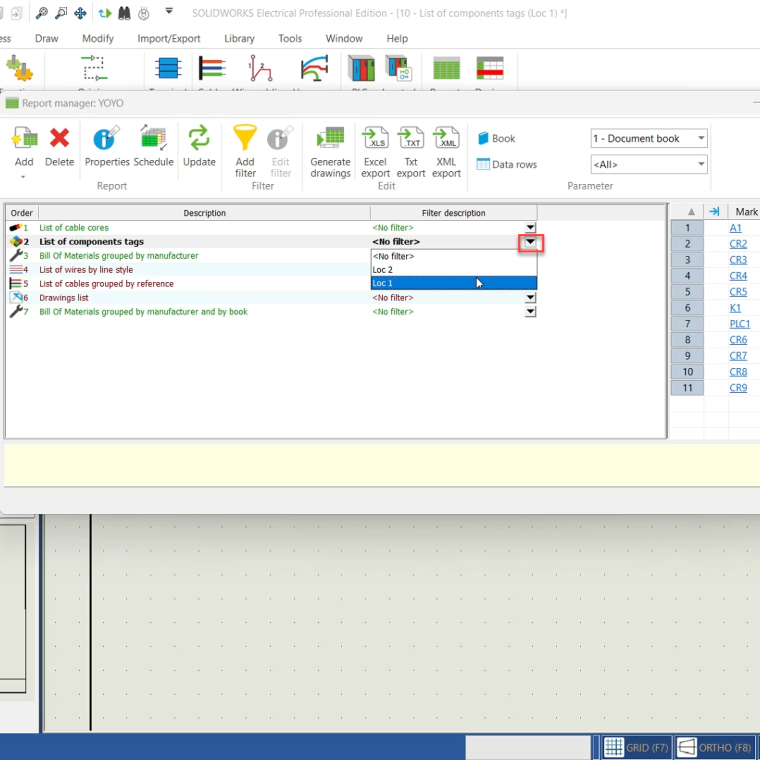
Arguably, the most effective skill for managing electrical projects is knowing how to filter reports in SOLIDWORKS Electrical. Learning to filter reports in SOLIDWORKS Electrical, specifically by book, is an effective tool to manage electrical…
How to Use Multiple Terminal Symbols in SOLIDWORKS Electrical
 By Jesse Deane on March 18, 2026
Prior to SOLIDWORKS Electrical 2025, unlike other electrical components, you were unable to insert multiple terminal symbols. Therefore, a workaround is required for single-level terminals in versions older than SOLIDWORKS 2025. While SOLIDWORKS Electrical 2025…
How to Resolve Corrupted Library Issues in SOLIDWORKS Electrical
By Danish Butt on October 23, 2025
The red X indicates that SOLIDWORKS Electrical has a corrupted library item and can not access it. Learn how to resolve the issue of an incorrect file path or a missing link to the shared Application Data folder.
Managing SOLIDWORKS Electrical Library Parts in SOLIDWORKS PDM
 By Alaa Hosn on September 15, 2025
Managing library parts efficiently in SOLIDWORKS Electrical can be critical for keeping projects organized and ensuring that data is consistent across teams. In a recent webinar, we discussed how SOLIDWORKS Electrical integrates with SOLIDWORKS PDM…
Creating Cable Fanouts in SOLIDWORKS Electrical Schematic
By Danish Butt on September 3, 2025
Cable fanouts are an essential aspect of electrical design, ensuring that wires are correctly connected and properly organized within a schematic. Setting up a fanout correctly improves clarity and prevents design errors. Schematic design tools like…
Integrating SOLIDWORKS Electrical with SOLIDWORKS PDM 2025
 By Ray Morrogh on September 2, 2025
Learn the key benefits of integrating SOLIDWORKS Electrical with SOLIDWORKS PDM 2025, how to connect your systems, and what TriMech offers to help you get the most out of this connection.
Automatic PLC Channel Addressing in SOLIDWORKS Electrical
By Alaa Hosn on August 27, 2025
Users building control panels know the pain of managing PLC channel addresses. Depending on what software users are using, this can be a very manual and tedious operation. Imagine clicking through each channel, having to…
Fundamentals of SOLIDWORKS Electrical Troubleshooting
By Jesse Deane on August 14, 2025
It is critical that your electrical schematic design tool is working properly so you and your team can continue to produce electrical documentation. In our case, knowing basic SOLIDWORKS Electrical troubleshooting steps could mean the…
Mastering SOLIDWORKS Electrical Backups to Protect Your Data
By Ray Morrogh on July 18, 2025
Data loss in any tool can mean hours of lost productivity and rework. That’s why having a solid, working SOLIDWORKS electrical backup strategy is critical for every design team using the platform.
Update and Replace Symbol Command Not Responding in SOLIDWORKS Electrical Schematic
By Jesse Deane on June 25, 2025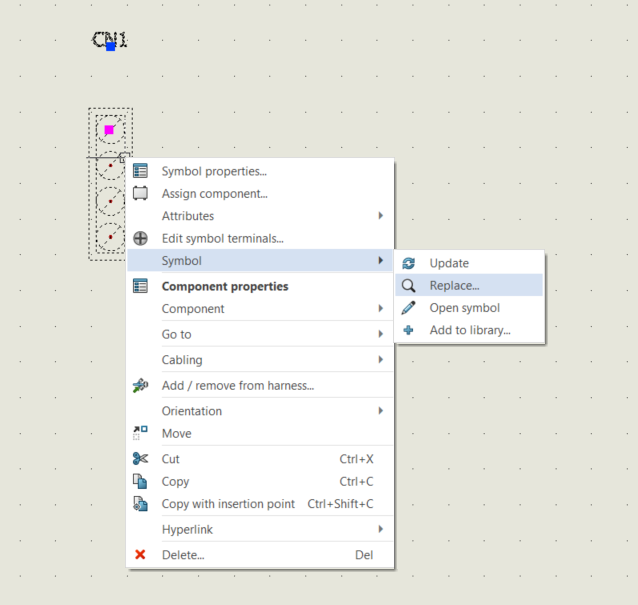
If your SOLIDWORKS Electrical Schematic symbols aren’t responding to the “Update” or “Replace” commands, the issue may stem from a communication blockage between the Electrical program and the Collaborative Server, often requiring IT configuration adjustments to resolve.
SOLIDWORKS Electrical Schematic: Adding Configurations to Application
By Jesse Deane on April 25, 2025
A question that comes up from time to time with SOLIDWORKS Electrical Schematic is how to apply changes made to configurations to other projects. For instance, let’s say you’ve changed the columns within your BOM,…
How to Round Up Length in SOLIDWORKS Electrical BOMs
By Danish Butt on March 21, 2025
Accurate bills of materials are critical to any team. To standardize lengths, configuring the SOLIDWORKS Electrical BOM to round up length can be a practical approach.
Troubleshooting SOLIDWORKS Electrical Collaborative Server Errors
 By Cameron Cintula on March 3, 2025
SOLIDWORKS Electrical can operate in a client-server configuration enabling data sharing in a multi-user environment. Multiple components make up the server side of an Electrical installation but one of the most important is the SOLIDWORKS…
Using the SOLIDWORKS Electrical Content Portal
By Ray Morrogh on February 12, 2025
Part of successfully creating projects and schematics in SOLIDWORKS Electrical is maintaining a usable and up-to-date library of symbols, manufacturer parts, and other electrical objects. This can be done either manually or by using integrated…
Troubleshooting the “Specified Module Could Not Be Found” Error in SOLIDWORKS Electrical
By Danish Butt on February 10, 2025
If you’re encountering the “specified module could not be found” error when launching SOLIDWORKS Electrical, you’re not alone. This is a relatively common error that can occur for a few different reasons but fortunately, there are simple fixes!

Design Services
From concept to manufacturing to scale, TriMech Design Services helps makers, startups, inventors, small manufacturers get to market.
Most Popular Posts

SOLIDWORKS 2024 Hardware Recommendations
TriMech has compiled this recommended SOLIDWORKS 2024 hardware guide to aid you in the process of upgrading or purchasing new hardware for SOLIDWORKS.

IMPORTANT! Transfer Activation Prior to Upgrading to SOLIDWORKS 2024
Prior to installing SOLIDWORKS 2024, you need to transfer activation from your prior release of SOLIDWORKS to ensure it’s available to activate SOLIDWORKS 2024.

SOLIDWORKS Packages Comparison
What is the difference between SOLIDWORKS® Standard, Professional and Premium 3D CAD software? Learn about the features included in each of the three SOLIDWORKS offerings.