


Blog Tag
Showing 61-75 of 173.
SOLIDWORKS PDM Standard
SOLIDWORKS PDM Standard Resources including technical tips and tutorials for users and administrators

How do I move files from one SOLIDWORKS PDM workflow to another?
A question I often come across while on tech support is: How do I move files from one SOLIDWORKS PDM…

How to set default values generation for new sheets in a SOLIDWORKS PDM Drawing
New in SOLIDWORKS PDM 2019, when you add new sheets to a checked-out SOLIDWORKS drawing file, SOLIDWORKS PDM generates default…

SOLIDWORKS PDM Client Install Quick Reference Guide
Overview This article aims to describe the steps to install SOLIDWORKS PDM in a client machine in a simplified way,…
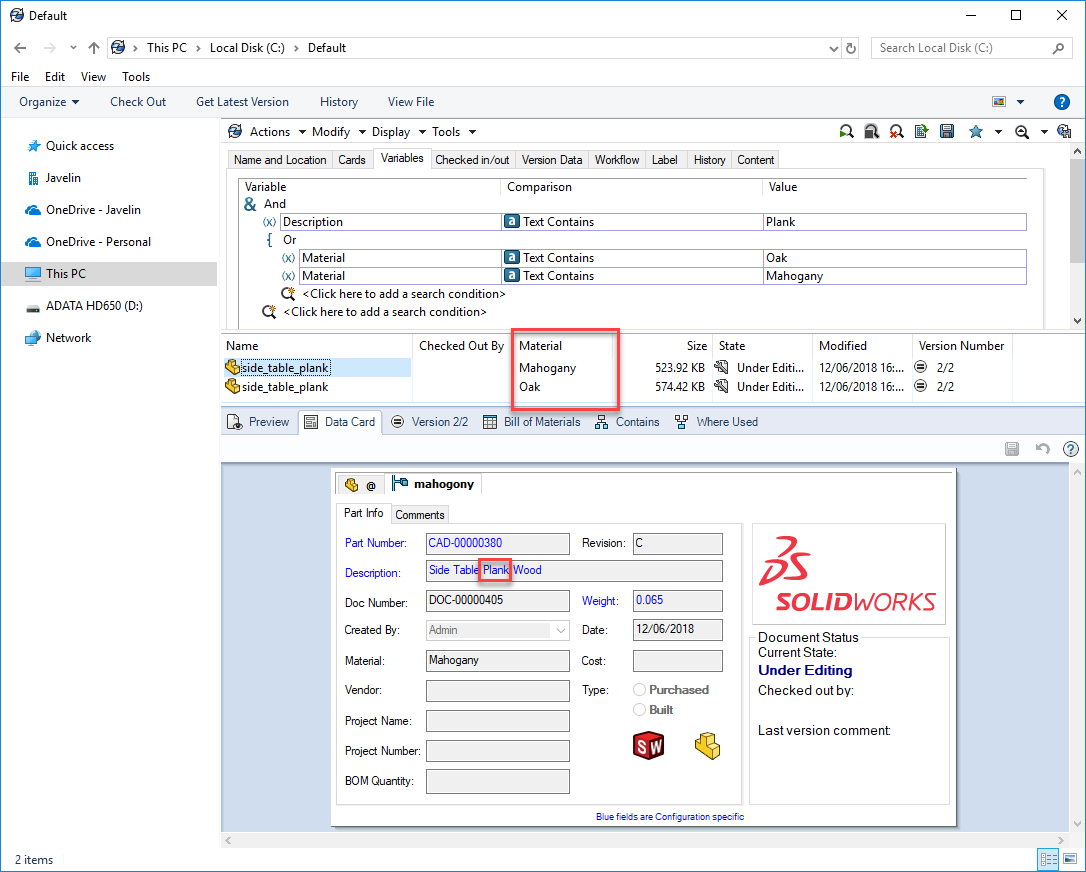
How to Perform an OR Type Search in SOLIDWORKS PDM
In SOLIDWORKS PDM entering values within multiple controls on a search card, performs an AND condition type search: This is essentially performing…

How to Show Preview Tabs in the SOLIDWORKS PDM Local Vault View
In SOLIDWORKS PDM Local Vault View, there is an option to select/deselect the Show preview tabs to get more information…

How to recover a deleted SOLIDWORKS PDM file
In the world of SOLIDWORKS PDM, nothing is truly gone until it’s DESTROYED. If you mistakenly delete a file (we…

How to Set up Revision Tables in SOLIDWORKS PDM
In SOLIDWORKS PDM 2018, the much-anticipated Revision Tables integration was added, and we can now automatically add table rows with updated…

SOLIDWORKS PDM Major and Minor Revision Numbering System
In this article, we are going to look at how to implement a SOLIDWORKS PDM Revision Numbering System, that incorporates…

SOLIDWORKS PDM Set Description Character Limit
Some ERP systems limit the description of a part to maximum of 30 characters. This can be controlled for SOLIDWORKS…

How to Switch the installation of a SOLIDWORKS PDM Professional Client to Standard
Part of the SOLIDWORKS PDM Standard Client installation is to select the SOLIDWORKS PDM Standard Client. But you can continue the…

SOLIDWORKS PDM 2019 Drawing Selection Option During State Change
New in SOLIDWORKS PDM 2019, we have the option: Do not select references that are defined as drawing nodes during state…

SOLIDWORKS PDM 2019 Conditional Notifications
New in SOLIDWORKS PDM 2019 we have the ability to; send notifications on a conditional basis, depending on data card variables….

SOLIDWORKS PDM 2019 Enhanced User Comment Permissions
New in SOLIDWORKS PDM 2019 with the enhanced user comment permissions; we have the ability to make version comments mandatory…

SOLIDWORKS PDM 2019 Logged in as User Default Value in Search Cards
SOLIDWORKS PDM User Default Value is new in SOLIDWORKS PDM 2019, whereby we can automatically define the logged in user…

How to retrieve an old version from within the PDM vault and save it as a new version
A question I often come across while on tech support is: “How do I retrieve an old SOLIDWORKS PDM File…