


Blog Tag
Showing 76-90 of 173.
SOLIDWORKS PDM Standard
SOLIDWORKS PDM Standard Resources including technical tips and tutorials for users and administrators
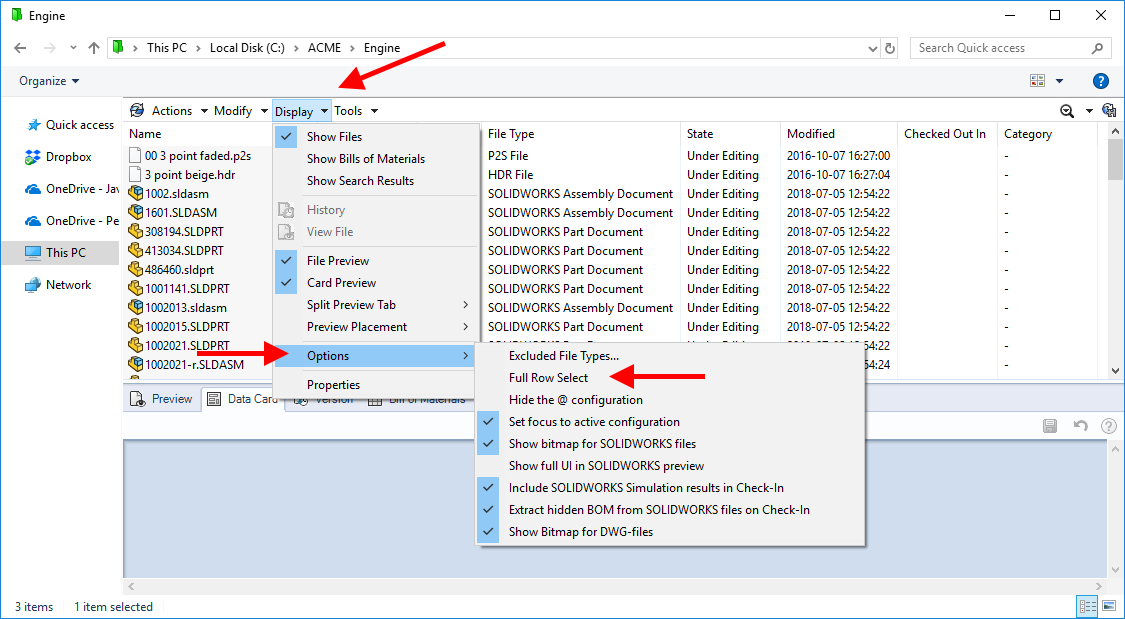
Are you using Full Row Select in your SOLIDWORKS PDM Vault View?
SOLIDWORKS PDM Full Row Select is one of the most useful interface options in the PDM Vault View and is…

Enabling the Windows Status Bar in SOLIDWORKS PDM
Every so often we’ll get a question from a SOLIDWORKS PDM user about the Windows Status Bar. The Status Bar…

SOLIDWORKS PDM Display Types in the Windows Explorer Local Vault
There are three SOLIDWORKS PDM Display Types available in the Windows Explorer Local Vault: Show Files Show Bills of Materials Show…

How to reset a vault specific SOLIDWORKS PDM Admin Password
In a previous post I showed you how to reset the ‘default’ SOLIDWORKS PDM Vault Admin Password. If you’ve ever had…

How to reset the default SOLIDWORKS PDM Vault Admin password
During the install of the SOLIDWORKS PDM Archive Server, you’re prompted to ‘Set the default admin login password’: Then when…

SOLIDWORKS PDM Permission Assignments Tool
If you’ve had the honor of being named the local vault administrator then it’s extremely likely that someone has approached…

SOLIDWORKS PDM Error: ‘Failed to extract add-in’
If you’ve recently upgraded to Windows 10 and you’ve received a SOLIDWORKS PDM error: ‘Failed to extract add-in…’ you’re not alone. …

How to create a SOLIDWORKS PDM folder shortcut in Windows 10
A desktop folder shortcut is a useful tool to quickly navigate to a folder you’re frequenting in SOLIDWORKS PDM. How to…

3 Reasons for Upgrading SOLIDWORKS PDM Standard to Professional
With fast-moving projects and complex designs, data management is extremely important in any environment. A primary goal of a data…

Configuring the SOLIDWORKS PDM Standard Drawing to PDF Convert Task
In SOLIDWORKS PDM Standard, PDF Convert Task can now be created to convert SOLIDWORKS Drawings to PDFs. Tasks are created…

Update File Attributes from SOLIDWORKS PDM Database
To update a file’s Custom Properties with the corresponding variable values in the SOLIDWORKS PDM Vault Database, select one or…

Converting a SOLIDWORKS Drawing to a PDF in SOLIDWORKS PDM Standard
New in SOLIDWORKS PDM Standard 2018, is the ability to run Convert to PDF on SOLIDWORKS Drawings. This is enabled…

What is the SOLIDWORKS PDM Message: ‘Enter a valid account for this resource’?
When using the View Setup utility to create a local vault view, the first thing you will be asked to…

SOLIDWORKS PDM Combobox Styles Reference
Within the SOLIDWORKS PDM (Data) Card Editor, there are four different Combobox Styles to list data; Combobox Dropdown, Combobox Simple,…

Setting SOLIDWORKS PDM Microsoft SQL Server to use a Static Port
For users to be able to log into SOLIDWORKS PDM they must be able to connect to the Microsoft SQL…