


SOLIDWORKS PDM 2019 Logged in as User Default Value in Search Cards

Article by Justin Williams updated September 17, 2018
Article
SOLIDWORKS PDM User Default Value is new in SOLIDWORKS PDM 2019, whereby we can automatically define the logged in user as the default value within a Search Card.
How to define the logged in user as the default value for the search card variable Checked Out by User
- Administration Tool > Cards > Search Cards > [Card Name]
For this example, we’re going to use the Complete Search Card

Within the Complete Search Card
- Card Properties > Default Values

Within the Default Values dialog;
- Select the variable ‘Checked Out by User’
- Set the value to; %User%
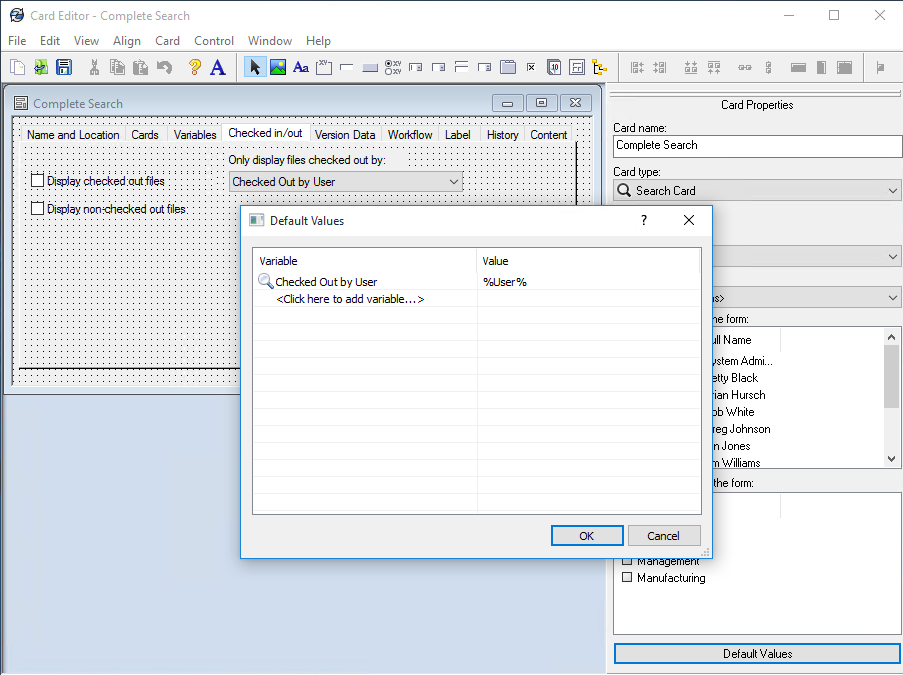
- Save and close the search card.
Now; the logged in user will be the default value for the variable Checked Out by User, within the Complete Search Card;

This option is available for other search card variables, such as; Label – by User, Version Created by User, Workflow- Transitions by User and Author.
How does this help improve our vault?
SOLIDWORKS PDM Search is a powerful tool. Incorporating this new SOLIDWORKS PDM User Default Value functionality removes the amount of input required for users, making the search tool easier to use and ultimately saves time by increasing users efficiency and promotes using the search tool more.
Previously, this option was only available via search favorites which is a feature exclusive to PDM Professional. With this enhancement, PDM Standard users can incorporate the automatic definition into the vault.
Related Links
Want to do more with SOLIDWORKS PDM?
Our Certified SOLIDWORKS PDM Experts can help you to:
Posts related to 'SOLIDWORKS PDM 2019 Logged in as User Default Value in Search Cards'
