


Blog Tag
Showing 46-60 of 102.
SW2018
SOLIDWORKS 2018 (#SW2018) tech tips and tutorials from the Javelin team

SOLIDWORKS 2018 Drawing Area Hatch applied to Layer
SOLIDWORKS 2018 Drawing Area Hatch can now be assigned to a specific layer. This provides more control over the colour of…

SOLIDWORKS 2018 Task Scheduler Includes Additional Import/Export File Types
SOLIDWORKS 2018 Task Scheduler has been enhanced to include more file types for Import and Export. Import Files now has an…

Balloon models & new import formats in SOLIDWORKS Inspection 2018
Starting with SOLIDWORKS 2018, the SOLIDWORKS Inspection Add-in supports creating reports from SOLIDWORKS part and assembly models. Balloons can be added…

SOLIDWORKS 2018 Hole Wizard Update
Much like when SOLIDWORKS made your first sketch dimension auto scale your whole part back in 2014, with the release of…

SOLIDWORKS Flow Simulation 2018 Colour Bar and Component Explore Enhancement
One of the graphical enhancements for result plots in SOLIDWORKS Flow Simulation 2018 is colour bar. Colour Bar Now the…

SOLIDWORKS 2018 Treehouse Visual Enhancements
SOLIDWORKS 2018 has added a number of improvements to the visual aspect of the Treehouse application (Start > SOLIDWORKS Tools…

Importing SOLIDWORKS Views, Cameras, and lights into SOLIDWORKS Visualize 2018
SOLIDWORKS Visualize 2018 has now made it easier to create real view renderings, since we can now import all custom…
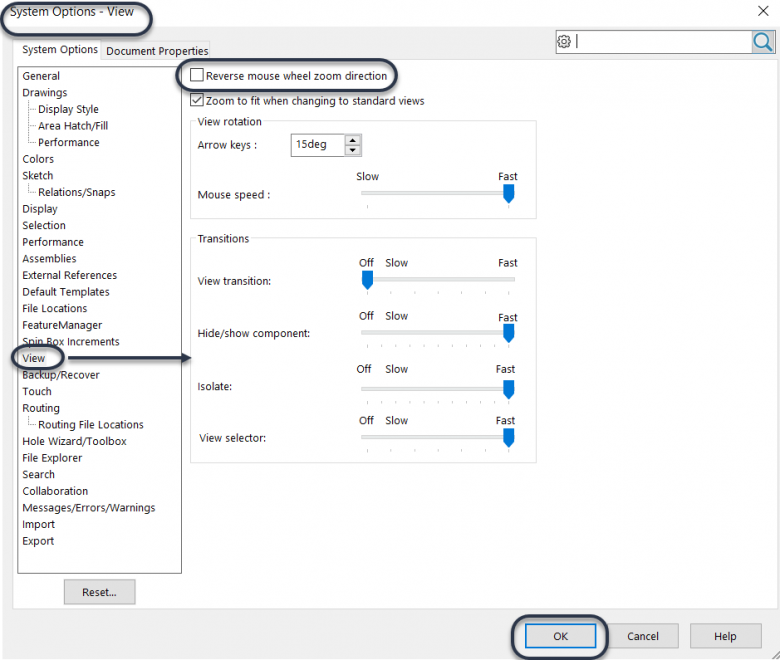
How to change the SOLIDWORKS zoom direction of your mouse wheel
When some companies/designers switch to SOLIDWORKS 3D design from other designing software they often have issues with zooming in and out…

Measure Tool Enhancements in SOLIDWORKS 2018
There has been many enhancements to SOLIDWORKS 2018 which will helps us overcome some of the earlier limitations. In this…

SOLIDWORKS 2018 can Select Over Geometry
With SOLIDWORKS 2018 a new geometry selection tool is introduced called Select Over Geometry. The selection tool lets you drag a…

How to Randomize Scale for Auto Hatching in Section Views
In SOLIDWORKS 2018, auto hatching in section views and broken-out section views has a new option called Randomize Scale. This…

Support for Misaligned Concentric Mates in SOLIDWORKS 2018
Working with downloaded or imported models can create a situation where multiple pairs of holes cannot be mated concentric although…

Show File Names and Descriptions in the SOLIDWORKS 2018 Design Library
The Design Library in the SOLIDWORKS Task Pane provides quick access to some default features, hardware, annotations, etc. This is…

SOLIDWORKS 2018 Mouse Gesture Enhancements
Mouse Gestures were introduced in SOLIDWORKS 2010 and are a real time saver when using SOLIDWORKS to bring your designs to…

SOLIDWORKS 2018 identifies Assembly Components with Geometry Errors
Checking models for geometry errors has been enhanced in SOLIDWORKS 2018. The SOLIDWORKS Check Entity results now includes the names…