


Blog Category
Showing 1-15 of 4,340.
SOLIDWORKS Tech Tips & Articles




The case against using the /3GB switch on 32-bit Windows
 By Alin Vargatu, CSWE on December 20, 2010
For those of us who are still using older workstations running 32 bit Operating Systems, applying the so called /3GB switch to get more memory allocated to SolidWorks is the first thing we consider when opening large files or running complex Simulation studies. There are a lot of people for whom the /3GB switch is working…
Process, Pneumatic, Hydraulic and Electric Schematics
 By Eric van Essen on December 16, 2010
When showing the electrical capabilities of E3.WireWorks to our customers I have had many of them ask me whether it is a suitable tool for doing other types of schematics as well. The types that are most commonly asked for are hydraulics and pneumatics but process design (P&ID) should not be excluded. A lot of…

Frustrated designers have spoken and have declared the most popular download of 2010. I have heard designers comment that the *@%*! is what they were thinking as their assemblies are taking too long to load. I have also heard that any article that has *@%*! in the title is likely an honest and straight forward view of what the word on the street is. Regardless of the speculation, the designers have spoken and the simple truth is that they are frustrated.
New in 2011 – You can now link model configurations between drawing views
By Alin Vargatu, CSWE on December 13, 2010
One of the modules that received the most enhancements in the 2011 version of SolidWorks is the Drawing Environment. Most of the new functionality is well documented in the “What’s New” document (Help menu/What’s New)…
Use the SOLIDWORKS Copy Settings Wizard to save and restore your custom menu and system options
 By Scott Durksen, CSWE on December 13, 2010
After spending the time in SOLIDWORKS to customize all your toolbar, menu, shortcut and system options, the last thing you want to do is go back and do it all over again. A computer crash,…
 By
By 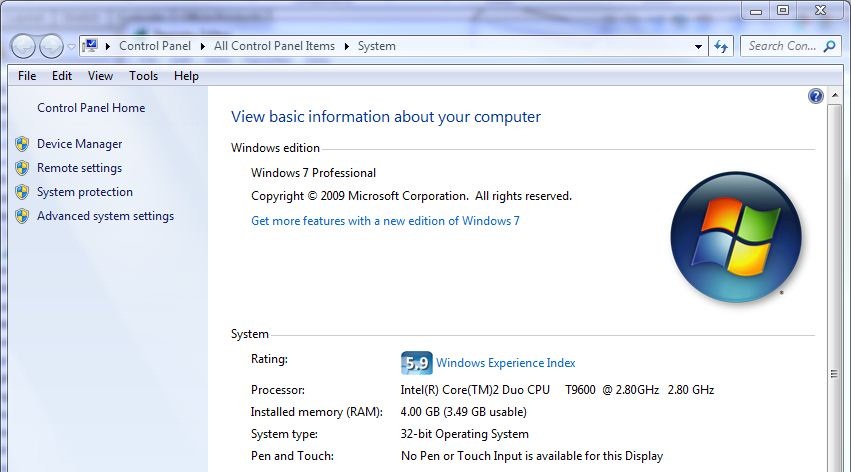
Most of us are likely familiar with a now commonly encountered limitation of 32 bit computer systems, they can only support a maximum 4 gigabytes of physical RAM. But you may wonder, why is this…
It’s the Little Things that Help the Earth
 By Lauren Murdoch on November 30, 2010
Here are a few ways I have changed in how I am doing things this fall. Try some yourself. I only run the dish washer once a week if possible Only have lights on if I’m in the room and need them Use re-usable bags when grocery shopping now Never keep things plugged in Started…
SolidWorks 2011 adds IFC file export
 By Adam Harte-Maxwell, CSWE on November 26, 2010
Are you a SolidWorks user who collaborates with architectural or building construction design? If so, I have good news! SolidWorks 2011 now provides Industry Foundation Classes (IFC) export based on the latest International Alliance for…
Why every designer and engineer should take a GD&T Fundamentals training course?
 By on November 24, 2010
Javelin recently added Geometric Dimensioning and Tolerancing (GD&T) to its comprehensive training portfolio. This article discusses why designers and engineers should take GD&T training and the benefits of attending a course with Javelin. GD&T is essential to ensure functional information and design intent from the assembly to its individual parts. This insures accurate fitting assemblies and…
NEW! in Simulation 2011 – 2D Simplification
 By Wayne Chen, CSWP on November 15, 2010
If you haven’t tried this, you should! 2D simplification study for Simulation Professional. It will save you a lot of time to conduct detailed analysis on your model. Let’s use a bolt and nut example:…
SolidWorks Composer in SolidWorks Enterprise PDM
By Eric van Essen on November 12, 2010
In SolidWorks Enterprise PDM 2011, we now have the ability to view SolidWorks Composer files directly inside the view tab in Windows Explorer and in the search dialogue. I see this changing the landscape for how…
You have upgraded your software. What about upgrading your users too?
By Alin Vargatu, CSWE on November 10, 2010I have just finished teaching the SolidWorks Refresher course and I was so amazed with the reaction I got from my students, that I wanted to share it with you. They were ecstatic with the new stuff they learnt. You should have heard the exclamations: Wow, if I would have known this last month, I would have…
I came across this blog that Jeff Sweeney wrote and I couldn’t agree more. I have been waiting for this feature for a long time and I am very excited that it is here. I see this functionality being a key contributor to making the migration of files into Enterprise PDM even easier. Have…
SOLIDWORKS Extend Surface command does not work with my model?
By Alin Vargatu, CSWE on November 10, 2010
You are a tool and die designer and your customer has just sent you an IGES file containing a solid with a complex face which has to be used as reference for your embossing die….
Increasing Your SOLIDWORKS Weldment Profile Library
By Scott Durksen, CSWE on November 10, 2010
SOLIDWORKS provides a library of standard weldment profiles that can be used for structural members. However, you also have the opportunity to download additional profiles or create your own. Download Additional Weldment Structural Member Profiles…

Design Services
From concept to manufacturing to scale, TriMech Design Services helps makers, startups, inventors, small manufacturers get to market.
Most Popular Posts

SOLIDWORKS 2024 Hardware Recommendations
TriMech has compiled this recommended SOLIDWORKS 2024 hardware guide to aid you in the process of upgrading or purchasing new hardware for SOLIDWORKS.

IMPORTANT! Transfer Activation Prior to Upgrading to SOLIDWORKS 2024
Prior to installing SOLIDWORKS 2024, you need to transfer activation from your prior release of SOLIDWORKS to ensure it’s available to activate SOLIDWORKS 2024.

SOLIDWORKS Packages Comparison
What is the difference between SOLIDWORKS® Standard, Professional and Premium 3D CAD software? Learn about the features included in each of the three SOLIDWORKS offerings.