


Blog Category
Showing 1-15 of 4,343.
SOLIDWORKS Tech Tips & Articles




Utilizing the Form Tool for Sheet Metal Parts
 By Ryan Burgess on October 8, 2025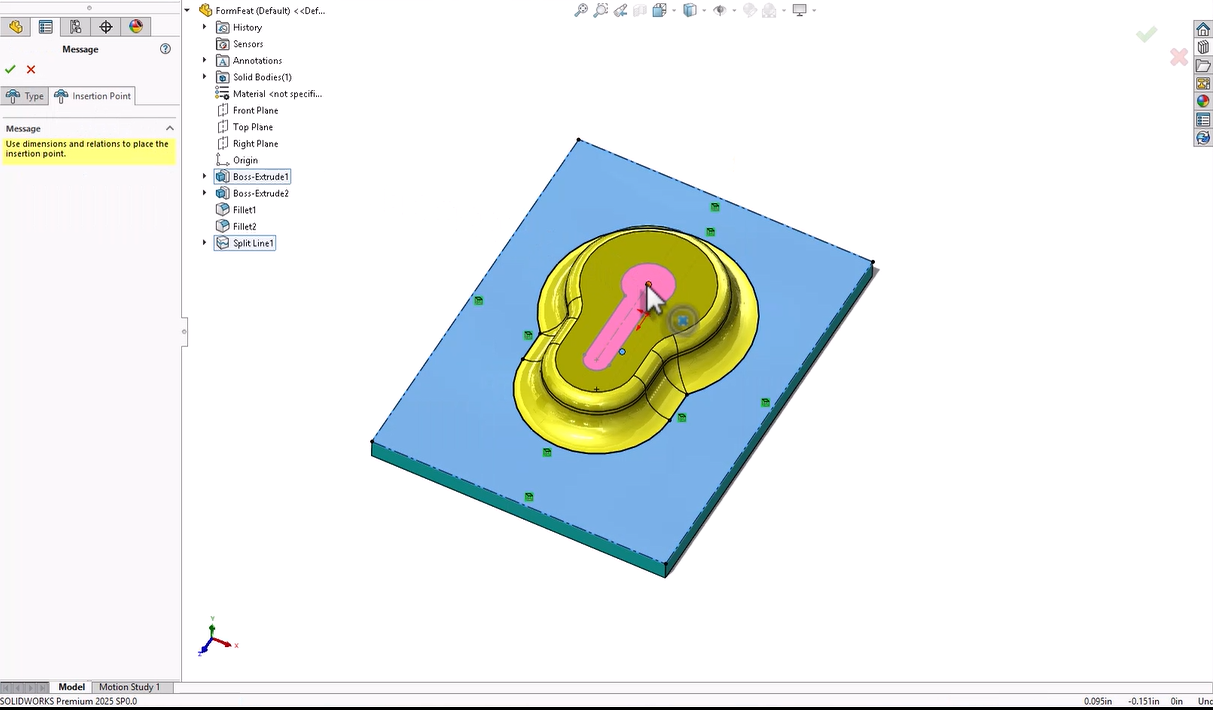
When designing sheet metal parts in SOLIDWORKS, the Form tool allows you to create shapes and features that are to be manufactured with a press or punch-style tool. This feature allows you to add more…
Why a CommandManager Tab May Appear in One Mode but Not Another | Customization Guide
 By Kiara Corbin on October 7, 2025
The CommandManager is the toolbar that appears across the top of the SOLIDWORKS window by default. The CommandManager displays different toolbars based on the type of document you are working on. Options that appear in…

DWG and DXF are widely accepted formats in the manufacturing world because they allow seamless communication between design and production teams. These formats are compatible with many CAM systems, CNC machines, and laser cutters, making…
Prevent External References Between Components in an Assembly
 By Sarah Taylor on October 3, 2025
External references, also known as in-context references, are created when a SOLIDWORKS sketch or feature utilizes reference geometry outside of the part that it was created within. This can help define the design intent while…
Master Linear and Circular Patterning in SOLIDWORKS xDesign
 By Wayne White on October 2, 2025
Patterning in SOLIDWORKS xDesign is at the heart of CAD modeling, enabling designers to create precise, repetitive features and design geometry. There are a couple of core options related to patterning, including linear and circular…
How to Change Your Email for SOLIDWORKS Accounts
 By Carleigh Amyot, CSWP on October 1, 2025
You might need to change your email for a number of reasons, whether it’s for a rebrand, a new role, or changing companies. No matter the reason, every once in a while, we all need…
How to Use CAD Packages to Collaborate with External Contractors on 3DEXPERIENCE CAD Data
 By John Lee, CSWE on September 30, 2025
If you’re a 3DEXPERIENCE platform user, you know that the platform is designed to keep your data secure and under control, remaining within the confines of the platform as projects move through the design process….
Working With Composite Materials in SOLIDWORKS Simulation Premium
 By Suman Sudhakaran on September 30, 2025
Composite materials, known for their superior strength-to-weight ratio, continue to revolutionize industries from aerospace to automotive. They are made of two or more constituent materials with different properties whose combination results in enhanced material characteristics…
Using the SOLIDWORKS PDM Web2 Client for External Access
By Ryan Burgess on September 29, 2025
Accessing SOLIDWORKS PDM remotely can be done through different means, but ensuring access across many devices, browsers, and operating systems can be done with the SOLIDWORKS PDM Web2 Client. SOLIDWORKS PDM is a powerful tool…
Using Paste as Reference to Create Links Between Files in SOLIDWORKS PDM
By Sarah Taylor on September 26, 2025
Everyone knows that SOLIDWORKS files are interconnected and fully associative by default. Drawings, Assemblies, and Part files reference one another so that design changes automatically update without having to manually track the modifications through a…
Best Practices for Taming the SOLIDWORKS View Palette
 By Mike Walloch, CSWE on September 25, 2025
SOLIDWORKS has many options designed to increase speed, efficiency, and user convenience. Unfortunately, they aren’t always the same, and improvements in one area can come at a cost in another. Such is the case when…
Your Complete Guide to Import Legacy Drawings from DXF/DWG
 By Jamie Hill, CSWE/CSWE-S on September 24, 2025
A while back, I inherited a project from a retiring engineer who’d been with the company since the ’90s. His desk was a treasure trove of perfectly crafted title blocks and detailed layout drawings, all…
The SOLIDWORKS Manage Add-in for SOLIDWORKS PDM
 By Lynette Proch on September 23, 2025
SOLIDWORKS PDM has been a staple for engineers who need to manage their CAD design data for years. The idea of having your revision control directly inside of Windows Explorer, the ability to view your…
Mastering Surface Modeling in xShape and xDesign
By Wayne White on September 22, 2025
Learn how xShape and xDesign simplify surface modeling for complex CAD models. Discover key tools like Delete Face, Offset, and Thicken for precise geometry.
Using SOLIDWORKS Visualize to Render a SOLIDWORKS Motion Study
 By Aleksandar Tepsic on September 19, 2025
Motion studies in SOLIDWORKS Motion Simulation inject life and movement into our models through realistic physics-based motion analysis. Pairing motion studies with photorealistic animation rendering using the seamless connection between SOLIDWORKS and Visualize Professional takes…

Design Services
From concept to manufacturing to scale, TriMech Design Services helps makers, startups, inventors, small manufacturers get to market.
Most Popular Posts

SOLIDWORKS 2024 Hardware Recommendations
TriMech has compiled this recommended SOLIDWORKS 2024 hardware guide to aid you in the process of upgrading or purchasing new hardware for SOLIDWORKS.

IMPORTANT! Transfer Activation Prior to Upgrading to SOLIDWORKS 2024
Prior to installing SOLIDWORKS 2024, you need to transfer activation from your prior release of SOLIDWORKS to ensure it’s available to activate SOLIDWORKS 2024.

SOLIDWORKS Packages Comparison
What is the difference between SOLIDWORKS® Standard, Professional and Premium 3D CAD software? Learn about the features included in each of the three SOLIDWORKS offerings.