


Blog Category
Showing 1-15 of 664.
SOLIDWORKS PDM
Tips and Techniques for SOLIDWORKS PDM (Product Data Management) software for Users and Administrators




EPDM – Support for Virtual Environments and Storage Appliances (NAS and SAN)
 By Joe Medeiros, CSWE on October 16, 2013
Recently I have come across issues with NAS drives being used for the SolidWorks Enterprise PDM Archive. If you are considering using these appliances, please review the below statement, from SolidWorks, first. Due to the many configurations and wide variety of virtual applications, Network Attached Storage (NAS), and Storage Area Network (SAN) appliances, it is…
SolidWorks Electrical 2014: What’s New?
 By Delvin Masilamani on September 19, 2013
Last year when SolidWorks announced it’s Electrical Package, it had every one intrigued with the hope & possibility of unifying the overall design process. After crossing into uncharted territory, it merged the Electrical Schematic world with…
Destroy Deleted Files to Avoid Duplicate File Errors in SOLIDWORKS PDM
By Joe Medeiros, CSWE on September 6, 2013
You attempt to check in a SOLIDWORKS PDM file, but you receive a message that ‘a file with this name already exists in the vault’. You perform a search and cannot find this file?! This…
EPDM – SolidWorks Enterprise PDM resources
By Joe Medeiros, CSWE on September 5, 2013
Many questions regarding SolidWorks Enterprise PDM can be answered by a variety of resources. These resources are often the best place to find the information you seek. Unfortunately, there are a number of resources and knowing which…
EPDM – BOM Permissions.
By Joe Medeiros, CSWE on September 4, 2013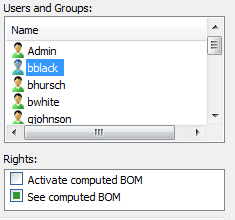
When creating a BOM, it is obvious that permissions need to be assigned in the Bill of Material – BOM dialogue box. What is often forgotten is to give the User/Group permissions to a…
EPDM – Troubleshooting Workflows – Conditions
By Joe Medeiros, CSWE on September 3, 2013
Troubleshooting Workflows can be complex and time consuming. In this article I have put together a few tips and tricks, that I have used in the past to resolve issues in Workflows relating to Conditions.
EPDM – Troubleshooting Workflows – User/Group Permissions
By Joe Medeiros, CSWE on August 30, 2013
Troubleshooting Workflows can be complex and time consuming. In this article I have put together a few tips and tricks, that I have used in the past to resolve permission issues in Workflows.
EPDM – Transition Action to run a Task
By Joe Medeiros, CSWE on August 28, 2013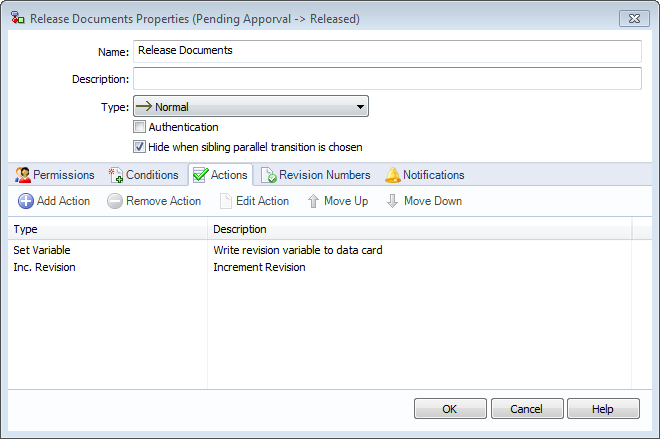
A Transition Action can be used to launch a Task. For instance, when a user changes the state of a drawing file, the file is saved as a PDF. In a workflow, double-click a transition…
EPDM – Accessing Local Vault View from Right Mouse Menu
By Joe Medeiros, CSWE on August 27, 2013
You have made some changes to your vault in SolidWorks Enterprise PDM Administration and would like to test those changes in Local Vault View. Right click on the vault and choose Explore. This will…
EPDM – Performing a Back-up using SQL Server Management Studio
By Joe Medeiros, CSWE on August 22, 2013
A back-up can be created using Collect Support Information and this method is the easiest, but it may be faster and more convenient to create a back-up directly from SQL Server Management Studio.
SOLIDWORKS PDM Grey Folders and Files in the Local Vault View
By Joe Medeiros, CSWE on August 20, 2013
On occasion I get asked “why are there SOLIDWORKS PDM Grey Folders or files in the Local Vault View?” A grey folder or file is located in the cache of the Local Vault View, but is…
PDM Templates- How to Add a Folder
 By Michael Nwachukwu on July 28, 2013
Templates can be used to create a new folder or even a folder structure. This can be done through a simple right click in the Explorer Vault View.
Re-Activating your EPDM Licenses after an update of your EPDM system [VIDEO]
 By Chris Briand, CSWE on July 20, 2013
One of the most common questions we receive from both new and experienced SolidWorks Enterprise PDM administrators is surrounding the procedure to update the EPDM licenses after an upgrade of the EPDM system or during the initial installation and setup of an EPDM System. Take a look at the following clip as I take you through the…
Exporting SOLIDWORKS PDM Vault Settings [VIDEO]
 By Andrew Lidstone, CSWE on July 13, 2013
If you are using SOLIDWORKS PDM to manage your documents, you are no doubt aware that PDM offers Administrators an incredible amount of control over how the vault interacts with users and with your documents. …
Using a Third Party Software as a Viewer in Enterprise PDM [VIDEO]
By Andrew Lidstone, CSWE on July 6, 2013
Viewing SolidWorks files, Microsoft Office files, dxfs, dwgs, pdfs and many other common documents in Enterprise PDM is as simple as selecting the file and looking at the preview tab. But what if you have files…

Design Services
From concept to manufacturing to scale, TriMech Design Services helps makers, startups, inventors, small manufacturers get to market.
Most Popular Posts

SOLIDWORKS 2024 Hardware Recommendations
TriMech has compiled this recommended SOLIDWORKS 2024 hardware guide to aid you in the process of upgrading or purchasing new hardware for SOLIDWORKS.

IMPORTANT! Transfer Activation Prior to Upgrading to SOLIDWORKS 2024
Prior to installing SOLIDWORKS 2024, you need to transfer activation from your prior release of SOLIDWORKS to ensure it’s available to activate SOLIDWORKS 2024.

SOLIDWORKS Packages Comparison
What is the difference between SOLIDWORKS® Standard, Professional and Premium 3D CAD software? Learn about the features included in each of the three SOLIDWORKS offerings.