


Blog Category
Showing 1-15 of 664.
SOLIDWORKS PDM
Tips and Techniques for SOLIDWORKS PDM (Product Data Management) software for Users and Administrators




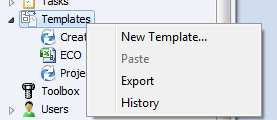
Templates can be used to create files from a master file (i.e. ECO’s), project folder structures and assign variables through a Template Card. This article will provide an overview of the main sections which can…
Automatically Naming SOLIDWORKS Files with Serial Number
 By Izaaz Sheikh on June 22, 2013
In SOLIDWORKS PDM, files can be automatically named or renamed when a file is saved. This setting can only be set when the ‘Admin’ user is logged in and this setting change needs to only…
PDM – Using “Link to content” to Define custom file properties in Excel
 By Joe Medeiros, CSWE on June 15, 2013
With ECO’s/ECN’s, consistency of data input can be ensured by populating the ECO’s/ECN’s with Variables (Custom Properties) entered through Data Cards. These ECO’s/ECN’s are often in the form of a Word or Excel documents. In this article we will…

The SQL server will use up memory based on available system resources. Once the memory is allocated it may not be released until the service is restarted. This is normal behavior for SQL and is not a memory leak….
EPDM – Indexing the Vault for Content Searching
By Joe Medeiros, CSWE on June 8, 2013When you index a vault archive, the search tool can use the content search option to search a document’s contents or properties. The first step is to set-up the Enterprise PDM index server, on the SQL Server hosting the vault database. The SolidWorks Enterprise PDM Installation Guide (found in the \Support\Guides\<lang> directory on the installation media) outlines how this…
EPDM – Don’t Prompt to Save Read Only Referenced Documents.
By Joe Medeiros, CSWE on June 2, 2013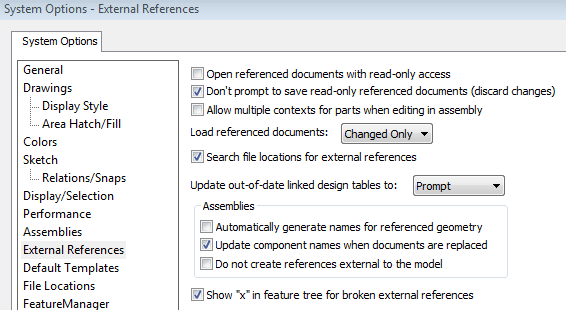
When saving a top level document you may be prompted to save any referenced documents that you do not own. This can result in being prompted multiple times to save these read-only documents. To avoid…

This article is a continuation on my previous articles relating to linking Data Card Variables, to Office Properties. In this article we will look at how to create a Word or Excel template that can be…
SolidWorks PDM – How to Reset the “sa” Password in SQL Server Management Studio
 By Jay Khajuriwala on May 25, 2013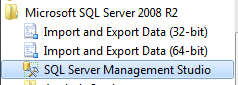
if you’ve forgotten or lost the “sa” (System Administrator) password for your SQL Server instance, you can reset it using Microsoft SQL Server Management Studio (SSMS). Here’s how you can do that in SQL Server…
EPDM – Saving the Event Viewer Log
By Joe Medeiros, CSWE on May 21, 2013
The EPDM user log file and the Archive Server log, can help to identify issues with EPDM, but some events are not captured by these logs. The Windows Application Log can often reveal issues not seen in…
Setting Up the Solidworks Workgroup PDM Viewer
By Joe Medeiros, CSWE on May 10, 2013
UPDATED May 1, 2015 A license of SolidWorks Workgroup PDM Advanced Server is required for use of the Solidworks Workgroup PDM Viewer. The SolidWorks Workgroup PDM Advanced Server is not included with Solidworks Basic Professional or Premium and must be…
EPDM – Adding a viewer to EPDM
By Joe Medeiros, CSWE on May 5, 2013
A default viewer can be assigned to preview selected file types from the Local Vault View. In the EPDM Admin Tool, either under the Group or User Node, right click on a group or user and select Settings….
EPDM – “SolidWorks Rename” Creates Duplicate File in the Vault
By Joe Medeiros, CSWE on April 26, 2013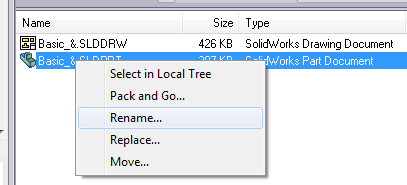
The SolidWorks rename option available from the SolidWorks Explorer or Windows Explorer will not handle renaming the vault file correctly as it only processes the locally cached copy of the file. It will not rename the vaulted file but create…
Populating cells in Microsoft Excel with EPDM variables
 By Chris Briand, CSWE on April 21, 2013
In prior posts we have shown you how to link EDPM variables to the custom properties of a Microsoft office document. What if you need to push that data into the cells of a Microsoft Excel Spreadsheet?
EPDM – Multi-Line Edit Box Character Limit
By Joe Medeiros, CSWE on April 19, 2013The Character limit that can be entered into a multi-line Edit box, of a data card is 2^20- 1 (1,073,741,823), but the custom property character limit of a program may have a smaller upper limit. For example in SolidWorks the upper limit is 1000 characters, while in Microsoft Office it is 256 characters. Adding more characters then the limit will result in a truncated…
EPDM – Enabling the eDrawings User Interface in the Explorer Preview Window
By Joe Medeiros, CSWE on April 17, 2013
For increased performance, the eDrawings User Interface is disabled in the Explorer preview window. To enable the eDrawings User Interface left click in the preview window. The eDrawings Toolbar can be displayed selecting “Show full UI in…

Design Services
From concept to manufacturing to scale, TriMech Design Services helps makers, startups, inventors, small manufacturers get to market.
Most Popular Posts

SOLIDWORKS 2024 Hardware Recommendations
TriMech has compiled this recommended SOLIDWORKS 2024 hardware guide to aid you in the process of upgrading or purchasing new hardware for SOLIDWORKS.

IMPORTANT! Transfer Activation Prior to Upgrading to SOLIDWORKS 2024
Prior to installing SOLIDWORKS 2024, you need to transfer activation from your prior release of SOLIDWORKS to ensure it’s available to activate SOLIDWORKS 2024.

SOLIDWORKS Packages Comparison
What is the difference between SOLIDWORKS® Standard, Professional and Premium 3D CAD software? Learn about the features included in each of the three SOLIDWORKS offerings.