


Blog Category
Showing 1-15 of 666.
SOLIDWORKS PDM
Tips and Techniques for SOLIDWORKS PDM (Product Data Management) software for Users and Administrators




EPDM – Multi-Line Edit Box Character Limit
 By Joe Medeiros, CSWE on April 19, 2013
The Character limit that can be entered into a multi-line Edit box, of a data card is 2^20- 1 (1,073,741,823), but the custom property character limit of a program may have a smaller upper limit. For example in SolidWorks the upper limit is 1000 characters, while in Microsoft Office it is 256 characters. Adding more characters then the limit will result in a truncated…
EPDM – Enabling the eDrawings User Interface in the Explorer Preview Window
By Joe Medeiros, CSWE on April 17, 2013
For increased performance, the eDrawings User Interface is disabled in the Explorer preview window. To enable the eDrawings User Interface left click in the preview window. The eDrawings Toolbar can be displayed selecting “Show full UI in…
EPDM – Copying items Between Vaults
By Joe Medeiros, CSWE on April 13, 2013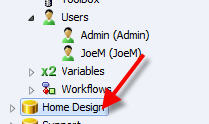
Items on one vault can be copied by drag and drop, to another vault. In the originating vault, left click on the item you want to copy and drop it onto the target vault. …
 By
By 
After updating your SOLIDWORKS PDM Professional vault to a newer major release you will receive a message similar to the below image when you try to access the vault. The above message does not make…
EPDM – Updating Broken File References
By Joe Medeiros, CSWE on April 2, 2013
Sometimes when files are moved, renamed or deleted, file references can be broken. Update References can be used to re-establish the file references.
Translating Parts from Inventor into SolidWorks while maintaining their Features
 By Chris Briand, CSWE on March 14, 2013
A quick update to this post as our good friends at SolidWorks were kind enough to point out that I had not given the Inventor View Product it’s due. To that end I thought I should clear up some more of the hearsay and rumor surrounding translating files from Autodesk’s Inventor Product. Translation of individual…
EPDM – How to Obtain a License File
By Joe Medeiros, CSWE on March 13, 2013
A new EPDM license file is required when you update to a new release of SolidWorks Enterprise PDM or if additional licenses are purchased. Your EPDM License File can be obtained from the SolidWorks Customer Portal at…
SolidWorks EPDM – Update Values in Files
By Joe Medeiros, CSWE on January 23, 2013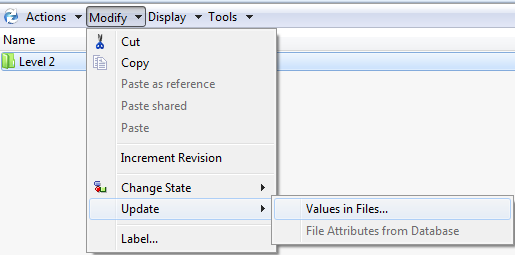
Changing the value of a variable in the Folder Card may not propagate to File Card, even though the File Card is set to inherit that value from the Folder Card. The “Update Values in…
EPDM – Using the Report Generator
 By Cody Foley on January 7, 2013
The SolidWorks PDM Report Generator provides the means of querying a SQL Database, without running the query from within SQL Management Studio In order to run Reports, a User or Group, must be granted this permission. This…
 By
By 
Over the last 7 years I have been working with EPDM I have had many clients justify the investment based purely on performance increase. Many clients without a PDM system in place need to work…
PDM – Mapping Variables to Microsoft Word
 By Izaaz Sheikh on December 13, 2012
EPDM variables can be mapped to a Microsoft Office document, automatically populating documents such as ECN’s (Engineering Change Notices). 1) In this article, the appropriate variable used will be Affects, and it has been configured…
 By
By 
Businesses want to automate the connection between Product Design and Operations to be more efficient and innovative throughout the product lifecycle. But traditional, top-down approaches to Product Lifecycle Management (PLM) are often too complex, time-consuming, and costly—making…
SOLIDWORKS PDM Collecting Support Information
By Joe Medeiros, CSWE on November 6, 2012The SOLIDWORKS PDM Professional Administration tool contains a wizard that can simplify collect support information to aid in troubleshooting. Here’s a video that demonstrates how this tool is used.
How to use the Ping Test to check for SOLIDWORKS PDM Connectivity Issues
By Joe Medeiros, CSWE on October 30, 2012
The SOLIDWORKS PDM ping test can be used to troubleshoot connectivity issues between the server and client computers, as well as between replicated archives. The video below illustrates how to do this along with the…
EPDM – What do all those Icons mean?
By Cody Foley on October 19, 2012
I frequently get asked, “What do all the icons mean?”. This legend is in the EPDM Help file, but it can be difficult to find. Below is the table from the help file, listing the…

Design Services
From concept to manufacturing to scale, TriMech Design Services helps makers, startups, inventors, small manufacturers get to market.
Most Popular Posts

SOLIDWORKS 2024 Hardware Recommendations
TriMech has compiled this recommended SOLIDWORKS 2024 hardware guide to aid you in the process of upgrading or purchasing new hardware for SOLIDWORKS.

IMPORTANT! Transfer Activation Prior to Upgrading to SOLIDWORKS 2024
Prior to installing SOLIDWORKS 2024, you need to transfer activation from your prior release of SOLIDWORKS to ensure it’s available to activate SOLIDWORKS 2024.

SOLIDWORKS Packages Comparison
What is the difference between SOLIDWORKS® Standard, Professional and Premium 3D CAD software? Learn about the features included in each of the three SOLIDWORKS offerings.