


Javelin / TriMech Author

Vipanjot Kaur, CSWP
How to change the SOLIDWORKS Composer Viewport Ground
 By Vipanjot Kaur, CSWP on February 10, 2020
When working in SOLIDWORKS Composer you will notice that there is a Dassault Systèmes logo on the SOLIDWORKS Composer Viewport Ground by default. If you want to remove this, or change it to something else you can. To access the SOLIDWORKS Composer Viewport Ground properties: Through…
How to create a Section View in SOLIDWORKS Composer?
By Vipanjot Kaur, CSWP on February 7, 2020
Section views are created to see the internal cross section of the model or peer inside the model — without moving or hiding any geometry. Normally, we create the section view in a SOLIDWORKS 3D model with the Section Tool from the Heads up view…
360 Degree Capture in SOLIDWORKS Composer 2020
By Vipanjot Kaur, CSWP on February 4, 2020
Now in SOLIDWORKS Composer 2020 we have a new option – “360° Capture” which captures a defined number of images of the model along a vertical axis performing a 360° clockwise rotation. Using this tool will help us efficiently publish/save custom views directly rather than…
SOLIDWORKS Composer 2020 Inlaid Text for Linear Arrows
By Vipanjot Kaur, CSWP on January 24, 2020
Earlier in SOLIDWORKS 2019 we used to place an arrow to show the details on the view, but to show what we were pointing to we used the “Text 2D” tool on Author Tab, to show a description. But now in SOLIDWORKS Composer 2020 linear…
Using Opacity property to hide and show actors in SOLIDWORKS Composer Animations
By Vipanjot Kaur, CSWP on September 12, 2019
While creating SOLIDWORKS Composer animations everyone uses the collaborative actors such as arrows, 2D text labels, digger views etc., to make animations more interactive and easier to understand. At some point you may want to hide some of these collaborative actors throughout the animation. NOTE:…
How to search for commands in SOLIDWORKS Composer 2019
By Vipanjot Kaur, CSWP on September 3, 2019
Until SOLIDWORKS Composer 2018 the search command was located within the File menu. Now, in SOLIDWORKS Composer 2019 the Search command is available on the ribbon. You can directly access Search to search for commands in the ribbon and recently used documents. On the…
Filter BOM by each book in SOLIDWORKS Electrical
By Vipanjot Kaur, CSWP on August 27, 2019
SOLIDWORKS Electrical has provided us with an option to create multiple books for each project, to keep our electrical projects and drawings more organized and easy to manage. Once we have multiple books created for multiple electrical sub-assemblies or functionalities, we can create separate Bill…
How to avoid updating views in SOLIDWORKS Composer by mistake?
By Vipanjot Kaur, CSWP on August 23, 2019
The SOLIDWORKS Composer Lock View tool can be used to avoid updating a view by mistake. Once the view is locked it can be unlocked when needed. Views in SOLIDWORKS Composer do not just change the orientation of the model like SOLIDWORKS 3D CAD. Views…
How to create a Fade-in-out effect for Digger views in SOLIDWORKS Composer animations
By Vipanjot Kaur, CSWP on August 15, 2019
The SOLIDWORKS Composer Digger tool lets you zoom parts of your model to show a detail view of complex geometry, you can change opacity, visibility, and capture a 2D image. Follow the steps below to use the SOLIDWORKS Composer Digger in animations and apply a…
How to create SOLIDWORKS Electrical Passive Symbol?
By Vipanjot Kaur, CSWP on August 14, 2019
You should create SOLIDWORKS Electrical Passive Symbols for the following situations: Symbol has no mark defined Symbol is not be shown on Bill of materials, Symbol has no manufacturer part information defined Or the Symbol does not consume a device mark or a device tag….
Aligning linear diameter dimensions in SOLIDWORKS drawings
By Vipanjot Kaur, CSWP on August 9, 2019
Diameter dimensions can be modified to display as linear dimensions if needed. To convert the diameter dimension into linear follow these steps: Step 1: Right click the Diameter dimension > Display options > Display as linear OR this can also be done by selecting the…
How to save a ScanTo3D (.3ds) file from a SOLIDWORKS part?
By Vipanjot Kaur, CSWP on August 8, 2019
You must have the SOLIDWORKS ScanTo3D Add-in enabled before you can save parts as the ScanTo3D 3DS file format. There are a few ways for you to enable SOLIDWORKS add-ins as described in this blog article. However, saving the part files directly as a ScanTo3D…
How to display the connection dots/points for symbols and wires in SOLIDWORKS Electrical?
By Vipanjot Kaur, CSWP on August 6, 2019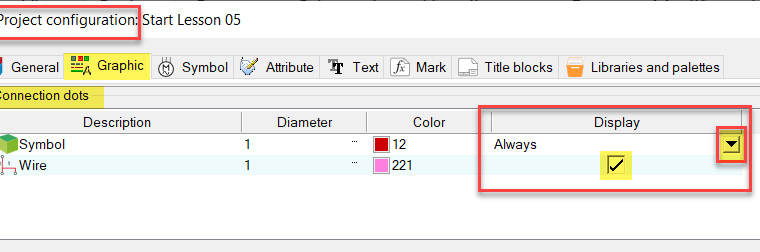
Some SOLIDWORKS electrical users like to display connection points within their electrical projects for both symbols and wires, but some do not. Connection points/dots for symbols and wires can be toggled on and off at the project level or specifically for each symbol. Control connection…
Problem running the latest or another version of eDrawings: “Input string is not in a correct format”?
By Vipanjot Kaur, CSWP on July 31, 2019
Recently an eDrawings user contacted our tech support asking why he couldn’t run newer or other versions of eDrawings on his machine. In this particular case the user was trying to run eDrawings 2019 but he already had eDrawings 2018 installed on the same machine….
Permanently changing the Automatic root value for symbols in SOLIDWORKS Electrical
By Vipanjot Kaur, CSWP on March 5, 2019
Within SOLIDWORKS Electrical each electrical symbol we place in schematic/line diagram drawings has a default root value assigned to it. This root value can be any alphabet from A to Z. At some point you must have thought of changing this default root value to…