


Blog Category
Showing 1-15 of 266.
3DEXPERIENCE Works
Techs tips for 3DEXPERIENCE Works Roles and Apps




3DEXPERIENCE Integration and Understanding Metadata
 By Wayne White on June 17, 2024
3DEXPERIENCE Integration is an option for those using 3DEXPERIENCE on Cloud for SOLIDWORKS CAD data management. Over time, companies have been provided more options to cater the experience in the Platform to their own liking.
How to Visualize Under-Constrained modes in Linear Structural Validation App on 3DEXPERIENCE Platform
 By Suman Sudhakaran on June 10, 2024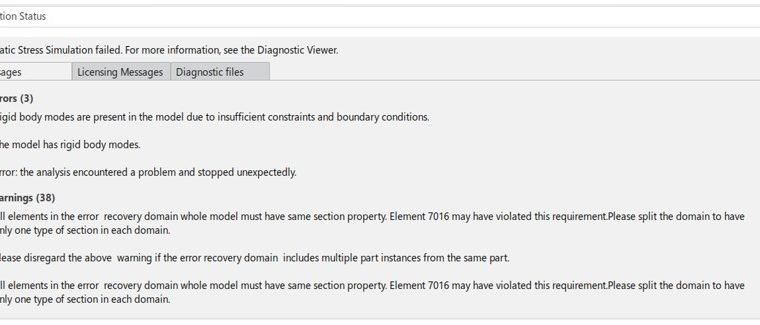
The Structural Designer role is one of the many simulation solutions available on the 3DEXPERIENCE platform. Learn more about the power of 3DEXPERIENCE to quickly pinpoint and fix under-constrained models with the Linear Structural Validation App for your designs and simulations.

3DEXPERIENCE Classification Manager is a powerful role that offers very easy ways to organize data. Perhaps the most powerful benefit is the quick manner in which users can classify and sort any object directly on the web and on any device.
Customize your 3DEXPERIENCE Mouse Controls to Match SOLIDWORKS
 By Ray Morrogh on May 15, 2024
In this blog, learn how to customize your 3DEXPERIENCE Mouse controls to follow the scheme of either SOLIDWORKS or CATIA.
Differentiating between 3DEXPERIENCE Title and File Name
 By Scott Durksen, CSWE on March 11, 2024
Learn how a 3DEXPERIENCE Title identifier is used for managing files on the 3DEXPERIENCE Platform
Finite Element Model Representations in Structural Simulation Apps on 3DEXPERIENCE platform
By Suman Sudhakaran on March 4, 2024
SIMULIA applications on the 3DEXPERIENCE Platform offer realistic simulation solutions for a wide range of problems. For structural analyses, the finite element analysis program requires users to create a finite element mesh that closely represents…

See a demonstration of SOLIDWORKS xDesign 2024 and learn how to collaborate on a design using 3DEXPERIENCE collaboration tools.
How to Delete Simulation Results on the 3DEXPRIENCE Platform
By Suman Sudhakaran on February 5, 2024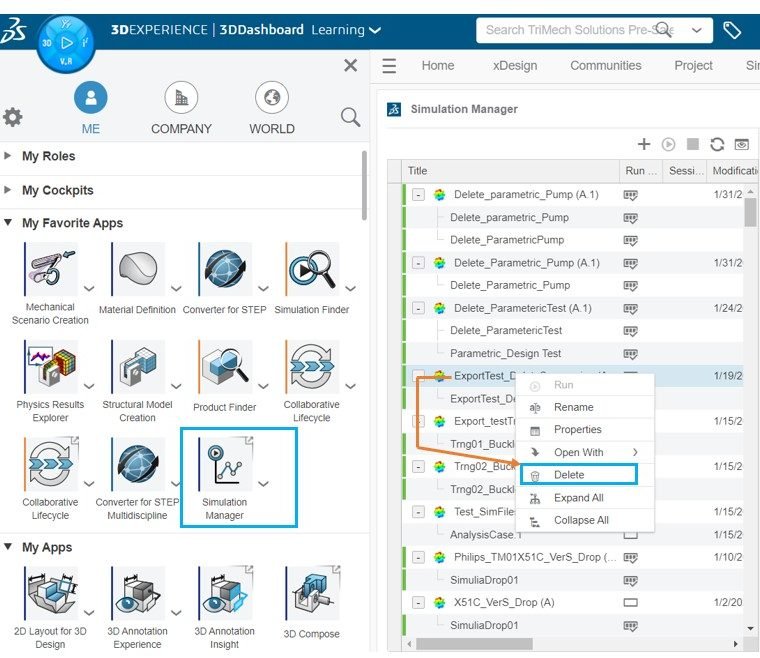
When it comes to running simulations on the 3DEXPERIENCE platform, there are few options available to the users to delete simulation results
SOLIDWORKS 2024 Cloud Services
 By TriMech Solutions, LLC on February 2, 2024
Watch our video to discover what’s new for SOLIDWORKS 2024 cloud services
PDM Search Capabilities in the 3DEXPERIENCE Platform – Save Searches
 By Ben Colley on November 17, 2023
3DEXPERIENCE Search Capabilities with 3DSearch The 3DEXPERIENCE Platform is, at its core, a data management tool. CAD users who have lived in the SOLIDWORKS ecosphere for a while will be familiar with the original data…
How to Change Your 3DEXPERIENCE Administrator
By Scott Durksen, CSWE on November 15, 2023
The 3DEXPERIENCE platform allows you to manage the user rights of all your members. After your order is processed, you will receive emails to agree to the terms and conditions (CLOSA) and a link to…
IP Funding for Startups: How can the 3DEXPERIENCE Works for Startups Program Help Your Startup Protect Your Intellectual Property?
 By Emma Krisfalusi on September 25, 2023
In the highly competitive world of startups, protecting your intellectual property (IP) is crucial to your success. Your IP serves as the foundation of your business, enabling you to differentiate yourself from competitors and build…
Where are the SOLIDWORKS Connected Tutorials?
 By Sawyer Gara on September 21, 2023
Learn how to access the great built-In, free SOLIDWORKS Connected tutorials integrated inside of 3DEXPERIENCE SOLIDWORKS.
 By
By 
Reducing monotonous tasks, such as data entry throughout the engineering design process, is a great way to boost a team’s efficiency. Simultaneously, this limits the potential for inconsistency and errors along the way. It’s now…
Asynchronous Save in the Background for 3DEXPERIENCE FD02
By Sawyer Gara on June 21, 2023
The 3DEXPERIENCE Platform recently upgraded to version 2023 FD02 which means we just got heaps of great new features added to our favorite platform tools. My favorite enhancement in this release, asynchronous save, is the…

Design Services
From concept to manufacturing to scale, TriMech Design Services helps makers, startups, inventors, small manufacturers get to market.
Most Popular Posts

SOLIDWORKS 2024 Hardware Recommendations
TriMech has compiled this recommended SOLIDWORKS 2024 hardware guide to aid you in the process of upgrading or purchasing new hardware for SOLIDWORKS.

IMPORTANT! Transfer Activation Prior to Upgrading to SOLIDWORKS 2024
Prior to installing SOLIDWORKS 2024, you need to transfer activation from your prior release of SOLIDWORKS to ensure it’s available to activate SOLIDWORKS 2024.

SOLIDWORKS Packages Comparison
What is the difference between SOLIDWORKS® Standard, Professional and Premium 3D CAD software? Learn about the features included in each of the three SOLIDWORKS offerings.