


Blog Category
Showing 1-15 of 666.
SOLIDWORKS PDM
Tips and Techniques for SOLIDWORKS PDM (Product Data Management) software for Users and Administrators




EPDM – What you Need to Know when Using Update References to Fix Broken References
 By Joe Medeiros, CSWE on September 6, 2011
File references can be broken when files are renamed, moved, or deleted. Starting with SolidWorks Enterprise PDM 2011, you can use the new Update References command to repair the broken references. My article, Updating Broken File References It is very important to understand that when you check files into the vault, if the Check-In dialogue box…
EPDM – What does “The docfile has been corrupted” message mean???
By Joe Medeiros, CSWE on September 6, 2011There can be many causes for this. One known cause is attempting to save over the network to a NAS or SANS device while exceeding the disk space allowance. If this error is only reproducible while attempting to save over the network, the next step would be to contact the IT department to investigate this…
PDM — Recreate Local Vault View with Checked Out Files
 By Karanvir Singh on September 6, 2011
In situations where files cannot be checked back in, deleting the local vault view for troubleshooting can risk losing all progress made on those files; therefore, it is essential first to create a backup of…
EPDM – Reinstalling SolidWorks – Use Caution When Cleaning Out Registry
By Joe Medeiros, CSWE on August 29, 2011DISCLAIMER: This blog article contains information on modifying your Windows Registry. It is always recommended that you take a backup of the Registry before editing any of the values because any improper editing can cause strange behavior and at worst could even corrupt your operating system completely, requiring you to re-install Windows. Proceed with any…
EPDM – Unsupported File Type???
By Joe Medeiros, CSWE on August 9, 2011
Here is an interesting article from the Solidworks Knowledgebase which can address some issues when using eDrawings to view files. What can cause eDrawings to launch but fail loading the file with “Unsupported file type” error…

Project Managers are constantly being pushed to the limits to keep their projects on time and within budget while maintaining a high degree of quality. As time-lines are being shortened and margins are being squeezed, project managers…
SOLIDWORKS PDM – Are you backing up your critical data? Here’s how you can be better prepared
 By Nadeem Akhtar on June 27, 2011
Protecting Your SOLIDWORKS PDM Vault: Why Daily Backups Are Non-Negotiable Imagine this: a critical design file disappears overnight. Maybe it was an accidental deletion, a virus attack, or a sudden hardware failure. Whatever the cause, without a solid backup strategy, recovering that data could be nearly impossible—and the cost to your business could be enormous….

Over the years, many customers have asked us to help them manage change. This means a lot of different things depending on who you talk to about it. To keep it simple, I distinguish change…
SOLIDWORKD PDM – Collect Support Information…
By Nadeem Akhtar on June 20, 2011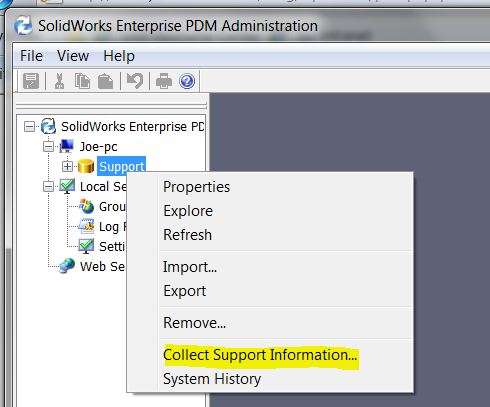
Sometimes the archive log file is not enough to troubleshoot your vault – the “Collect Support Information…” tool allows you to quickly generate a variety of logs and reports. STEP 1: In the SOLIDWORKS PDM Administration, login to PDM…
PDM – Deleting a Search Favorite from the Local Vault View
 By Michael Nwachukwu on June 13, 2011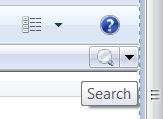
Finding where to delete unwanted Search favorites can be tricky if you don’t know where to look. Next to the Quick Search bar is a drop down menu. From there, you select the Search Tool. List…
PDM – Safely Deleting and Recreating a Local Vault View
By Michael Nwachukwu on June 13, 2011
Checking in Checked out Files Below are steps to safely delete and recreate a Local Vault View, sometimes abbreviated as a “LVV“. These steps should be performed by a user with PDM Administrative permissions. Before…
Let’s do Less Work… (with automation)
 By Rod Mackay on May 20, 2011
How about this? Do less work + yet get more accurate and error-free drawings and sign-offs? Sound good? Then this post is for you… I wanted to write…
Testing Connectivity to SOLIDWORKS PDM Archive Server using the Ping Test
By Nadeem Akhtar on April 18, 2011
In order to troubleshoot SOLIDWORKS PDM connectivity issue between the Archive Server and client, a simple ping test can be used. The ping test is performed on the client computer. From inside Windows “Start”, select…
3 Reasons Why Manufacturers need CRM (Customer Relationship Management)
By Rod Mackay on February 22, 2011The team at Audaxium (Javelin’s sister company) has a long history with manufacturing companies. We’ve spent more than our fair share of time working with Engineering departments talking about design. We’ve taken over whiteboards during ERP integration planning sessions. And we’ve helped companies improve their document control systems. But some of the most intriguing discussions take place…
Fastest growing customer segment for file management
 By Eric van Essen on February 16, 2011
It is no surprise that the fastest growing market segment for file management is the small to medium sized teams. With todays competitive landscape, it is crucial that these smaller teams are doing everything they can to compete with the big players in their industry. I am currently working with over 100 different companies that have realized that managing their files effectively and standardizing how work is being created and changing hands is on the critical path for overall company competitiveness. One reason why so many smaller teams are so interested in this solution recently is with the unique approach our implementation team has taken. A key advantage to working with Javelin best practices is that it makes it really easy to add additional functionality down the road that works perfectly with the overall system. A good example of this is the new SR&ED time tracking tool set that Javelin has developed to work with our best practice vault. Enroll in our upcoming webinar on March 22, 2011 to see our recommended vault setup and track project time effectively.

Design Services
From concept to manufacturing to scale, TriMech Design Services helps makers, startups, inventors, small manufacturers get to market.
Most Popular Posts

SOLIDWORKS 2024 Hardware Recommendations
TriMech has compiled this recommended SOLIDWORKS 2024 hardware guide to aid you in the process of upgrading or purchasing new hardware for SOLIDWORKS.

IMPORTANT! Transfer Activation Prior to Upgrading to SOLIDWORKS 2024
Prior to installing SOLIDWORKS 2024, you need to transfer activation from your prior release of SOLIDWORKS to ensure it’s available to activate SOLIDWORKS 2024.

SOLIDWORKS Packages Comparison
What is the difference between SOLIDWORKS® Standard, Professional and Premium 3D CAD software? Learn about the features included in each of the three SOLIDWORKS offerings.