







What is the Artec Point?
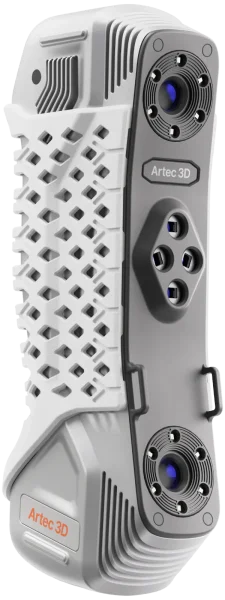
Metrology Grade hand-held laser 3D scanner. Artec Point rapidly captures complex surfaces, even those featuring black or shiny exteriors – with up to 0.02 mm accuracy for quality control.
How does it work?
With super high accuracy, solid tracking, and dedicated modes for complex geometries, the Artec Point 3D scanner captures high-resolution metrology data you can count on.
Alternate between grid, parallel, and single-laser modes to maximize results and use HD cameras fixed at a steep viewing angle to capture in narrow areas. With a light yet robust metal chassis, the Artec Point is also versatile for use in demanding industrial environments.
Artec Point Capabilities
Metrology-grade accuracy
Artec Point captures complex surfaces with incredible accuracy and repeatability, consistently delivering high-quality data for industrial metrology.
Incredibly easy to use
Most of Artec Point’s main functions can be carried out with four easy-to-access buttons that users are able to configure for optimal workflow efficiency.
Steadfast tracking
Capture objects at a rate of up to 120 FPS for tracking that stays fully locked onto objects, ensures there are no holes in your data, and makes Artec Point a breeze to use.
Switch mode for tricky surfaces
Change between three modes for best results – a high-speed grid, parallel lasers for complex geometry capture, and a single laser for obscure geometries like deep holes.
Magnify for a closer look
Zoom in to view surfaces up to 8x more closely for complete scan coverage that picks up tiny details that may not be visible upon first glance.
Wide field of view
The Artec Point 3D laser scanner features a vast scanning area that allows it to capture larger objects while keeping targets in view for seamless, high-speed 3D scanning.
Artec Point Features

ISO & VDI/VDE-certified
Artec Point’s high accuracy and repeatability are ISO & VDI/VDE-certified, so you can use it for advanced metrology, confident that you’ll get immediate, reliable results.
With an intuitive interface and unshakable tracking, Artec Point ensures that you get repeatable results regardless of operator skill, without having to fine-tune any settings

Robust build quality
With a featherweight frame and ergonomic design, Artec Point can easily be used one-handed, and tilted to scan under, behind, or into seemingly unreachable areas.
Housed in a metal, grip-friendly casing, the Artec Point 3D scanner is ideal for industrial metrology applications where durability is essential.

Real-time Visualization
Artec Studio’s intuitive colour-coded 3D Radar gives users the feedback needed to adjust their scanning approach for optimal data capture in real time.
Divide scans into sections, uncover defects with Artec Studio’s 3D Compare Map, and ensure products meet standards with intuitive Tolerance Checking.

Scanning Modes
Artec Point’s three modes allow you to switch between scanning large objects at pace, capturing intricate details, and digitizing deep holes, at the click of a button.
- Ultra-fast scanning: 17 crossed blue lasers
- Hyper-fine scanning: 7 parallel blue laser lines
- Deep hole scanning: 1 single blue laser line
Specifications
Review the specifications of the Artec Point
| Resolution & accuracy | |
|---|---|
| Resolution, up to | 0.02 mm |
| Accuracy, up to | 0.02 mm |
| 3D accuracy over distance, up to | 0.015 mm + 0.035 mm/m (0.0006 in + 0.0014 in/ft) 0.015 mm + 0.015 mm/m with Artec Metrology Kit (0.0006 in + 0.0006 in/ft) |
| Scanning range | |
|---|---|
| Size of scanning object/area | S–L |
| Working distance | > 300 mm |
| Linear field of view H×W @ furthest range | Up to 700 × 600 mm |
| Depth of field | 550 mm |
| Speed | |
|---|---|
| 3D reconstruction rate for real-time fusion, up to | 120 fps |
| Data acquisition speed, up to | 2.8 mln measurements/s |
| Scanning modes | |
|---|---|
| Ultra-fast scanning | 17 crossed blue lasers |
| Hyper-fine scanning | 7 parallel blue laser lines |
| Deep hole scanning | 1 single blue laser line |
| Hardware | |
|---|---|
| Scanner type | Handheld |
| Power source | AC/DC power adapter, 24V |
| Interface | USB 3.0 |
| 3D structured-light source | Class II blue laser (eye-safe) |
| Dimensions H×D×W | 203 × 80 × 44 mm |
| Weight | 0.57 kg/1.3 lbs |
| Warranty | 1 year |
| Compatibility | |
|---|---|
| Supported OS | Windows 10, 11 |
| Recommended computer parameters | Intel processor with 8 cores, 16 threads, 2.6 GHz and above, 64+ GB RAM, GPU with 8 GB VRAM |
| Minimum computer requirements | Intel processor with 8 cores, 16 threads, 2.6 GHz and above, 32+ GB RAM, GPU with 4 GB VRAM |
| Output formats | |
|---|---|
| 3D mesh | OBJ, PLY, WRL, STL, AOP, ASC, PTX, E57, XYZRGB |
| CAD | STEP, IGES, X_T |
| Measurements | CSV, DXF, XML |
Software
Revolutionary 3D scanning and data processing software

Creating 3D scanning masterpieces requires smart and powerful software to capture, process, analyze and edit data. Now anyone can achieve professional results with the most comprehensive and straightforward 3D scanning software on the market today.
- User-friendly and intuitive interface for smooth, expertly guided 3D scanning
- Quick and easy start-up process. No special positioning requirements, just point and shoot
- Artec Studio software is compatible with tablets as well as 3D sensors, and together with the battery pack for the 3D scanner, you can easily create professional scans anytime and anywhere
- Get high quality scans every time with a smart tracking system that ensures correct movement of the scanner and object capture
- Stop or pause scanning and continue exactly from where you left off, with the smart
auto-continue feature - Achieve equally great results using both manual and Autopilot modes


Capturing data is easy with an Artec 3D Scanner
A three step automatic process using advanced software

1. Scan the object
No need to prepare your object in advance, just point the 3D scanner and shoot in automatic mode.

2. Fuse & Optimize
Optimize the size of your final file by reducing the number of polygons from millions to thousands while maintaining the high quality of the mesh.
3. Measure
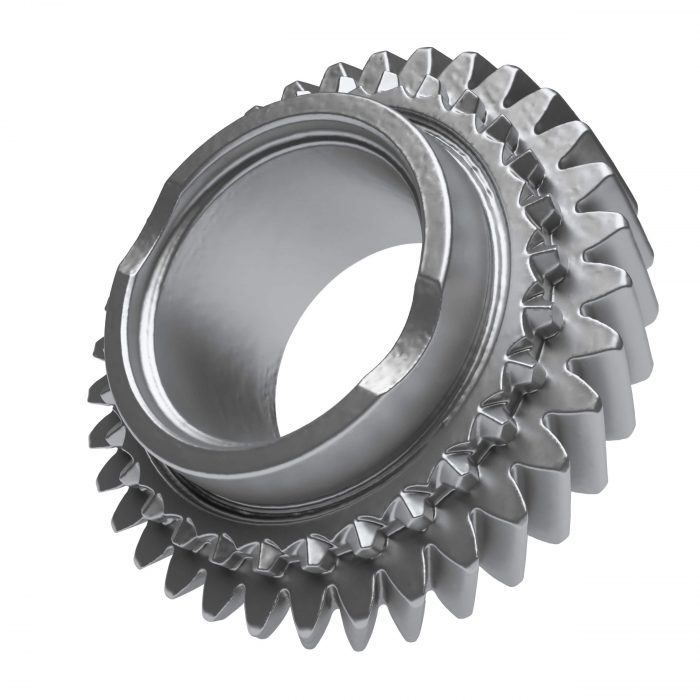
Conduct measurements and evaluation then export to a variety of different CAD systems including SOLIDWORKS.
Artec Point FAQs
Yes, Artec Point is a target 3D scanner. This means that users will need to attach targets to any object they wish to capture for best results. But after calibration the process is the same as other Artec 3D scanners – simply capture and process scan data on Artec Studio.
Interested in an Artec Point 3D Scanner?
Call us free at 1-877-219-6757 and get your questions answered