







SOLIDWORKS Electrical | What’s New in SOLIDWORKS 2026
SOLIDWORKS 2026 introduces a suite of enhancements that elevate electrical design to new levels of precision, flexibility, and efficiency. Whether you’re designing complex harnesses or managing component libraries, SOLIDWORKS 2026 empowers you to work smarter thanks to streamlined workflows.
Come explore the standout features in SOLIDWORKS Electrical that make SOLIDWORKS 2026 a must-have for companies looking for a competitive edge.
Improved Manufacturer Part Import
Managing manufacturer parts is a foundational task in electrical design. SOLIDWORKS Electrical 2026 introduces a refined import process that simplifies how terminal and circuit values are handled.

SOLIDWORKS Electrical manufacturer part import
Instead of manually entering repeated values for each terminal, engineers can now input them once in an Excel file, and the software automatically applies them across all relevant components. This enhancement not only saves time but also reduces the risk of data entry errors, especially beneficial when dealing with large libraries of parts.
Dynamic Connector Insertion
Connector-heavy designs often require meticulous symbol placement and terminal selection. The new dynamic connector insertion interface now includes advanced filters for circuit and terminal selection.
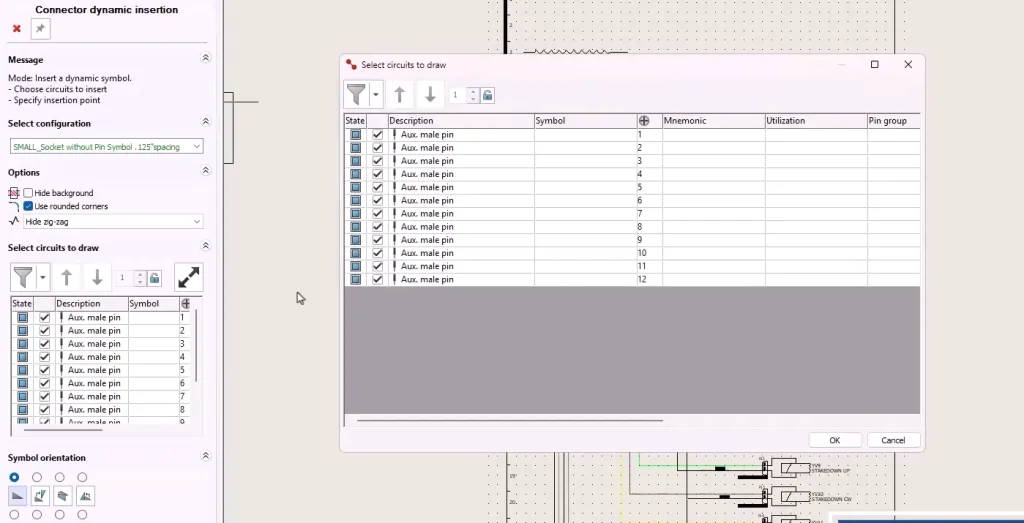
Filtering inserted pins for a connector
This is particularly useful for connectors with high pin counts, allowing electrical designers to quickly deselect or include specific terminals during symbol insertion. This results in a more intuitive and efficient design experience.
Associating Accessory Components
Assigning accessory parts to terminals and circuits has never been easier. SOLIDWORKS 2026 offers multiple methods for associating accessories, whether through selection menus, right-click options, or drag-and-drop functionality.
Once assigned, these accessory components are reflected in connection labels, complete with manufacturer part numbers and termination details. This feature enhances documentation accuracy and supports better communication with manufacturing teams.
Improved Documentation Export
Documentation is a critical part of any engineering workflow. The updated PDF export functionality now includes options to export by project, document, or file, with customizable naming formulas for folders and files.

Exporting an electrical schematic to PDF
Additionally, automatic orientation detection ensures that both landscape and portrait drawings are correctly rotated in the final output. These improvements make it easier to generate professional, print-ready documentation directly from SOLIDWORKS Electrical.
Bulk Connection Point Editing
SOLIDWORKS Electrical 3D users will appreciate the new ability to edit connection point parameters in bulk. A new command in the feature tree opens a table listing all connection points in the active file, allowing stub lengths to be updated collectively. This eliminates the need to edit each feature individually, significantly reducing setup time and minimizing the chance of configuration errors.
Individual Wire Routing
The new Route Selected Wires command allows engineers to route individual wires within a project, offering greater control over wire paths. This brings the functionality more in line with traditional SOLIDWORKS Routing commands.
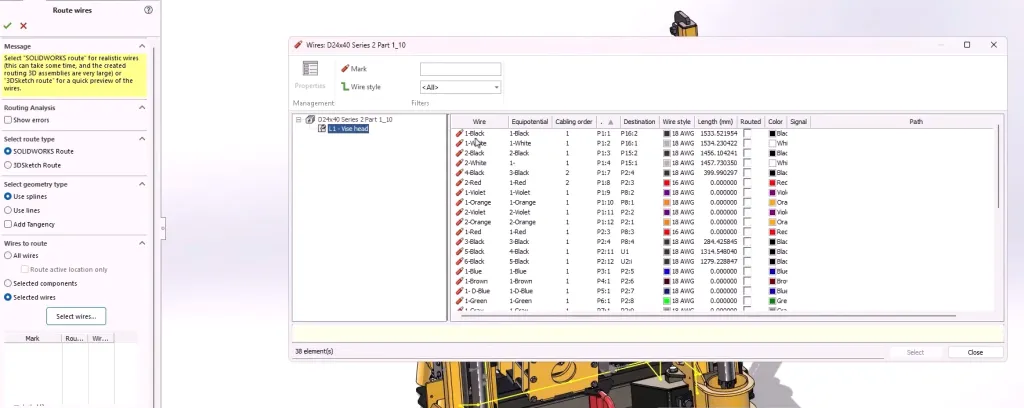
Routing specific wires in SOLIDWORKS Electrical 3D
This is ideal for verifying fit within tight spaces or for managing specific design constraints. Whether you’re routing from pin to pin or checking wire paths through support structures, this feature enhances flexibility during the design phase.
Additional Connector Table Properties
Manufacturing drawings heavily benefit from the new connector table enhancements. Electrical designers can now add columns displaying additional route properties, provided the data exists in the From-To list.

Adding a new column to the connector table
This allows for more complete flattened drawings, improving clarity and reducing the need for manual annotations. The ability to update all tables simultaneously ensures consistency across documentation.
Upgrading to SOLIDWORKS 2026
SOLIDWORKS Electrical 2026 delivers meaningful improvements that simplify electrical design while enhancing control and integration. From smarter wire routing workflows to intuitive import options and library management, these updates reflect the evolving needs of professional engineers.
Whether you need assistance during the upgrade process or just want to explore these great new enhancements, TriMech is your trusted technical partner. Our team is here to help ensure that upgrading to SOLIDWORKS 2026 is one of the best decisions you make.
To learn more about SOLIDWORKS 2026 and get a trial, click here.
Find more resources:
Related Content
Want to see more recorded demos? Watch one of our on-demand webinars: