







SOLIDWORKS Simulation | What’s New in SOLIDWORKS 2026
SOLIDWORKS 2026 introduces a suite of enhancements that elevate SOLIDWORKS Simulation to new levels of precision, flexibility, and efficiency. Whether you’re looking to streamline study setup, improve result accuracy, or gain additional design insight, SOLIDWORKS Simulation 2026 empowers you to work smarter thanks to streamlined workflows.
Come explore the standout features in SOLIDWORKS Simulation that make SOLIDWORKS 2026 a must-have for companies looking for a competitive edge.
Remote Loads on Shell Edges
One of the most practical updates in SOLIDWORKS Simulation 2026 is the ability to apply remote loads and masses directly to shell edges. Previously, such loads were limited in their application, often requiring workarounds or additional geometry.

Remote load definition on shell elements
Now, the simulation setup is more intuitive and aligned with how forces are actually distributed in practice. This is a game-changer for engineers working with sheet metal or thin plate structures, where edge-based loading is more representative of real-world conditions.
Improved Setup Feedback
The simulation study setup can be complex, especially in large assemblies with mixed element types. SOLIDWORKS Simulation 2026 introduces a smarter error dialog that pinpoints missing materials, undefined bodies, or problematic mesh controls.
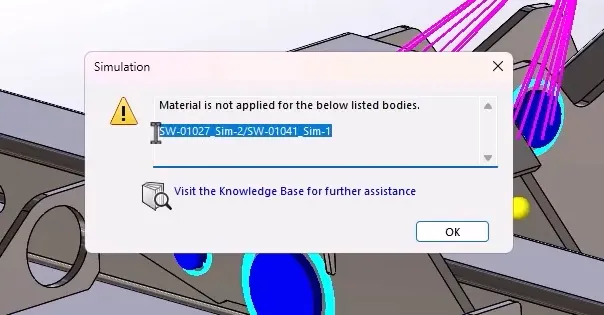
SOLIDWORKS Simulation setup feedback
This enhancement significantly reduces troubleshooting time and helps engineers get to solving faster. It’s particularly beneficial in collaborative environments where multiple users contribute to model setup.
Displacement Plots for Rotation
Displacement analysis is a cornerstone of structural simulation, and now, engineers can go deeper with rotational displacement plots.
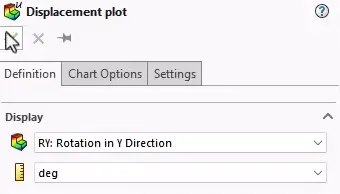
Defining a rotational displacement plot
SOLIDWORKS Simulation 2026 allows users to define rotational displacements relative to the X, Y, and Z axes, reported in either radians or degrees. This is especially useful for assemblies with moving parts or components subject to torsional forces, helping identify potential operational issues before they arise.
Default Shell Type
Shell elements are ideal for analyzing thin-walled structures, but choosing between thin and thick shells has traditionally required manual setup. SOLIDWORKS Simulation 2026 introduces the ability to set the default shell type, now with thick shells as the new standard.
Thick shells account for shear stress through the mid-plane, improving accuracy in rotational analysis and reducing deflection. SOLIDWORKS users can also adjust plate thickness directly in the shell manager for fine-tuned control.
Pin Connector Forces from Dynamic Simulation
Dynamic loading conditions, such as those encountered during drilling or transport, can introduce resonance and fatigue. SOLIDWORKS Simulation 2026 now supports connected reaction force calculations in dynamic response studies for pin connectors.
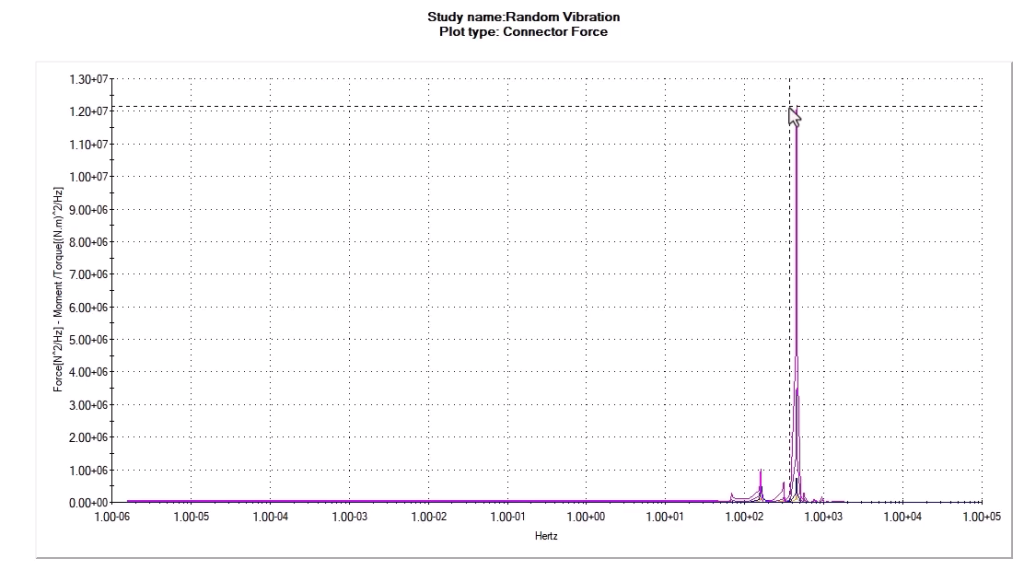
Pin connector response force plot
This is vital for assemblies that rely on pin joints to transfer loads, allowing engineers to evaluate how these connections behave under vibration and ensure structural integrity.
Distributed Loads on Beam Elements
Beam analysis has been made more intuitive with the ability to define total force across multiple beams or apply distributed mass per item. This mirrors how engineers conceptualize real-world structures, whether distributing weight evenly or applying a combined load. The result is faster setup, fewer manual inputs, and more accurate simulations. It’s ideal for trusses, frames, and other load-bearing assemblies.
Positive Value Filtering for Buckling Results
Buckling analysis is essential for understanding structural failure under compressive loads. In previous versions, negative load factors complicated interpretation by indicating load reversal. SOLIDWORKS Simulation 2026 introduces a new option to extract only positive eigenvalues, filtering out irrelevant modes and focusing on critical load factors. This enhancement simplifies results and provides clearer insight into structural stability.
Upgrading to SOLIDWORKS 2026
SOLIDWORKS 2026 delivers meaningful improvements that simplify simulations while enhancing control and integration. From better error feedback to intuitive remote load creation and default shell definition, these updates reflect the evolving needs of professional engineers.
Whether you need assistance during the upgrade process or just want to explore these great new enhancements, TriMech is your trusted technical partner. Our team is here to help ensure that upgrading to SOLIDWORKS 2026 is one of the best decisions you make.
To learn more about SOLIDWORKS 2026 and get a trial, click here.
Find more resources:
Related Content
Want to see more recorded demos? Watch one of our on-demand webinars: