







Video
Javelin Demonstration, Case Study, and News Videos

SOLIDWORKS Helps Tevva Lead the Market in Electric Truck Technology
Watch the video to discover all the ways Tevva uses SOLIDWORKS tools to enhance its business, be leaders in their industry, and change the commercial vehicle industry with the development of electric trucks: To protect the future of our planet, industries such as urban transport need to focus on clean air and sustainability. Tevva is…

SOLIDWORKS PDM Price and Feature Comparison
Compare SOLIDWORKS PDM Standard, Professional, Manage and 3DEXPERIENCE Works PDM / ENOVIA, along with an approximate price and costs for implementation and training.

Connect SOLIDWORKS Desktop to the Cloud for Collaborative Design
How will connecting SOLIDWORKS desktop software to the cloud improve your daily workflows? Watch the video to learn about collaborative design.

Concurrent Design and Engineering with 3DEXPERIENCE SOLIDWORKS
Combine your 3D CAD, Data, and Processes all in one place. The 3DEXPERIENCE® SOLIDWORKS® Offers connects the industry-leading SOLIDWORKS 3D CAD Desktop solution to the 3DEXPERIENCE Works platform, a complete cloud connected concurrent design environment. Concurrent Design and Project Management The 3DEXPERIENCE® SOLIDWORKS® offers intuitive parametric and subdivision modeling, photo rendering and structural simulation capabilities,…
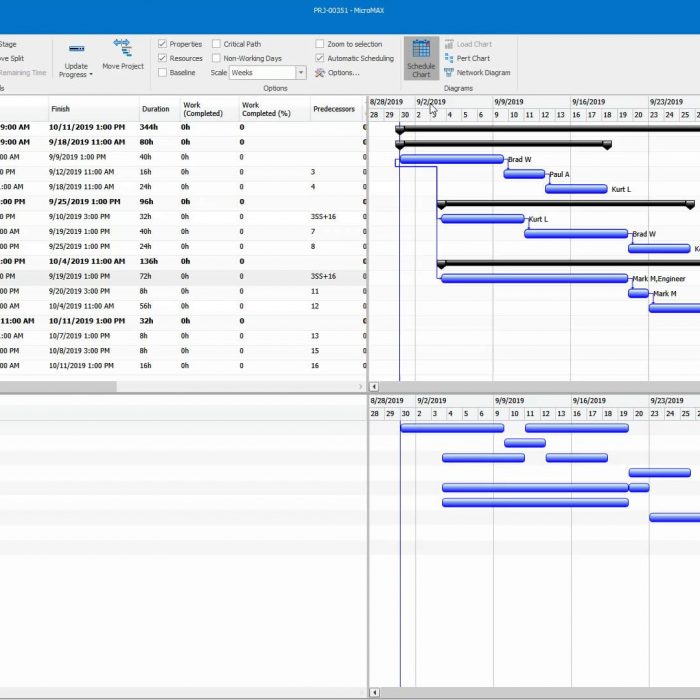
SOLIDWORKS Manage Products and Projects
SOLIDWORKS Manage provides critical information to help teams focus on important tasks and provides an overview of resource capacity for better planning and utilization of products and projects. Manage project stages, timelines, and milestones. View resource utilization and capacity. Attach items, files, and list deliverables. Utilize user tasks and timesheets to track progress. About SOLIDWORKS…
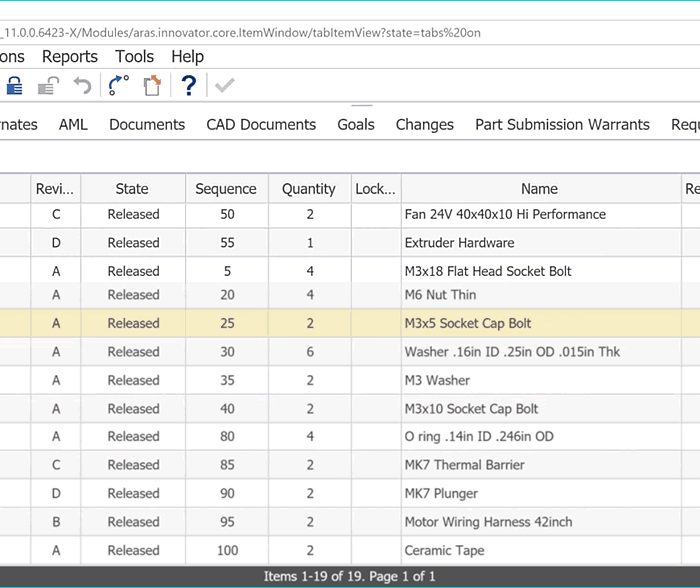
Bill of Materials (BOM) in SOLIDWORK Manage
SOLIDWORKS Manage brings together, in one place, all components required for product definition, whether represented by a CAD model, document, or database-only items. SOLIDWORKS Manage allows cross functional collaboration on the BOM and different versions can be generated when required for different teams or applications. Create, edit and compare Bills of Materials (BOMs) using items…